The Serverless Black Box: What You Lose on Databricks Serverless Compute

Databricks serverless compute promises a simple deal: stop managing clusters and just run your workloads. No instance selection. No autoscaling policies. No driver sizing. Just submit your query or job and let Databricks handle the rest.
The pitch is compelling. The reality is a black box that removes not just infrastructure management, but your ability to observe what is happening, tune how it runs, and control what it costs.
This is Part 3 of our Databricks observability series. In the previous post, we documented how system tables leave critical metrics gaps. Serverless makes those gaps dramatically worse — because on serverless, you lose even the tools that classic compute provides.
What Serverless Actually Means on Databricks
Databricks offers serverless across three workload types:
- Serverless SQL Warehouses — for BI queries and SQL analytics
- Serverless Jobs Compute — for scheduled ETL, notebooks, and pipelines
- Serverless Interactive Compute — for notebook development (preview)
In all three cases, Databricks provisions and manages the underlying infrastructure. You do not choose instance types, configure cluster policies, or manage autoscaling. Databricks handles all of it.
What is not obvious from the marketing is everything you lose in the process.
The 6 Spark Configs You Are Allowed to Set
On classic compute, you can set hundreds of Spark configurations — shuffle partitions, memory fractions, broadcast thresholds, speculation, AQE settings, and more. These are fundamental tuning levers for Spark performance.
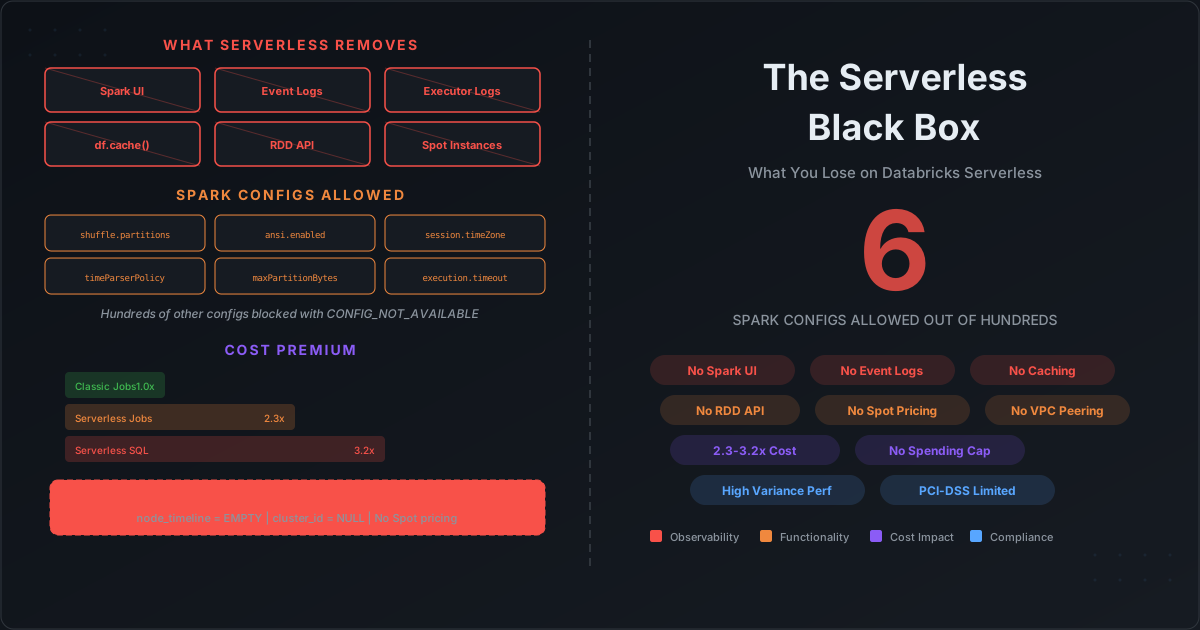
On serverless, you get exactly six:
| Configuration | What It Controls |
|---|---|
spark.sql.shuffle.partitions | Number of shuffle partitions (default 200) |
spark.sql.ansi.enabled | ANSI SQL compliance mode |
spark.sql.session.timeZone | Session timezone |
spark.sql.legacy.timeParserPolicy | Legacy date/time parsing |
spark.sql.files.maxPartitionBytes | Max bytes per partition when reading files |
spark.databricks.execution.timeout | Execution timeout |
Everything else is blocked. If you try to set any other Spark config — broadcast threshold, memory overhead, speculation, AQE skew join threshold, or any of the hundreds of other tuning parameters — you get:
[CONFIG_NOT_AVAILABLE] Setting the Spark config "spark.sql.autoBroadcastJoinThreshold"
is not available on Databricks Serverless Compute.
This means:
- No broadcast join tuning — you cannot force or prevent broadcast joins
- No memory fraction adjustment — if your jobs spill to disk, you cannot allocate more execution memory
- No AQE fine-tuning — Adaptive Query Execution runs with Databricks defaults, which may not match your data distribution
- No speculation — long-running straggler tasks cannot be speculatively re-executed
- No shuffle service configuration — you cannot tune the external shuffle service behavior
For simple SQL queries, the defaults may be fine. For complex ETL pipelines that process hundreds of gigabytes with skewed joins and large aggregations, losing these tuning levers means accepting whatever performance Databricks defaults deliver — and paying for the extra compute time when those defaults are suboptimal.
APIs That No Longer Work
Serverless does not just limit configuration. It removes entire categories of Spark functionality.
Caching Is Gone
The DataFrame caching APIs throw exceptions on serverless:
# All of these fail on serverless compute
df.cache()        # UnsupportedOperationException
df.persist()      # UnsupportedOperationException
df.checkpoint()   # UnsupportedOperationException
On classic compute, caching is one of the most effective performance optimizations for iterative workloads — machine learning pipelines, multi-pass aggregations, interactive exploration. If the same DataFrame is used in multiple downstream operations, caching avoids recomputation.
On serverless, every reference to the same data triggers a full recomputation from storage. For workloads that previously relied on caching, this can mean 2-5x longer execution times and proportionally higher costs.
RDD API Is Unavailable
Serverless uses Spark Connect as the client protocol, which only supports the DataFrame/Dataset API. The entire RDD API is unavailable:
# None of these work on serverless
sc.parallelize([1, 2, 3])           # Not available
rdd.mapPartitions(custom_fn)        # Not available
df.rdd.getNumPartitions()           # Not available
spark.sparkContext.setLocalProperty  # Not available
While most modern Spark workloads use DataFrames, the RDD API is still needed for:
- Custom partitioning logic
- Low-level data manipulation that DataFrame API does not support
- Legacy codebases that have not been migrated
- Debugging (checking partition counts, inspecting data distribution)
Streaming Is Limited
Spark Structured Streaming on serverless only supports Trigger.AvailableNow. Continuous processing and processingTime triggers are not available. This means serverless cannot be used for low-latency streaming workloads — only batch-style micro-batch processing.
No Custom Libraries in Notebooks
On serverless notebooks, you cannot:
- Attach JAR libraries
- Use init scripts to install system packages
- Access DBFS via FUSE mount (
/dbfs/) - Use custom Docker containers
If your workload depends on a native library (like a custom UDF compiled as a JAR, or a system package for geospatial processing), it will not run on serverless notebooks without significant rearchitecting.
The Observability Black Hole
This is where serverless gets truly painful for teams that care about cost control and performance optimization.
No Spark UI
On classic compute, the Spark UI gives you stage-level DAGs, task duration distributions, shuffle read/write metrics, GC time per executor, memory usage, and speculation metrics. It is the primary tool for diagnosing why a Spark job is slow.
On serverless, there is no Spark UI. You cannot see:
- How many stages your job has
- Which stage is the bottleneck
- Whether tasks are skewed
- How much data is being shuffled
- Whether executors are GC-thrashing
No Event Logs
Classic compute writes Spark event logs that can be analyzed after the job completes. These logs contain every stage, task, and executor metric that the Spark UI displays. They are the foundation for post-hoc performance analysis.
Serverless does not generate event logs. There is no after-the-fact analysis possible. Once a serverless job completes, the execution details are gone.
No Executor or Driver Logs
On classic compute, you can access driver logs and executor logs through the cluster UI. These logs contain application-level output, error stack traces, and custom logging from your code.
On serverless, executor logs are not accessible. Driver logs have limited availability through the Databricks UI, but the detailed executor-level logs that help diagnose data-related failures are not available.
System Tables Are Empty for Serverless
As we covered in the previous post, system.compute.node_timeline provides OS-level CPU and memory metrics for classic compute. On serverless, this table returns zero rows — because Databricks does not expose the underlying nodes.
The system.billing.usage table does record serverless consumption, but with cluster_id and node_type set to NULL. You can see that you spent money, but you cannot correlate cost to infrastructure details.
-- What you see for serverless in billing.usage
SELECT usage_date, sku_name, usage_quantity, usage_unit
FROM system.billing.usage
WHERE sku_name LIKE '%SERVERLESS%';

-- usage_date | sku_name                          | usage_quantity | usage_unit
-- 2026-03-15 | JOBS_SERVERLESS_COMPUTE_STANDARD  | 47.2           | DBUs
-- cluster_id: NULL
-- node_type: NULL
You know you consumed 47.2 DBUs. You have no idea on how many executors, how much memory, or what instance types were used. You cannot determine whether right-sizing would have reduced costs because you do not know what size was used in the first place.
No Spending Caps
Unlike classic compute where you can set cluster autoscaling limits and terminate clusters after idle timeout, serverless has no spending cap mechanism. There is no way to set a maximum budget for a serverless SQL warehouse or a serverless job. If a query runs longer than expected — perhaps due to a missing predicate that triggers a full table scan — there is no safety net.
The Cost Premium
Serverless is not just a black box. It is a more expensive black box.
DBU Rates: 2-3x Higher
Comparing DBU rates across compute types on AWS (prices as of early 2026):
| Compute Type | DBU Rate ($/DBU-hour) | Relative Cost |
|---|---|---|
| Jobs Compute (classic) | ~$0.15 | 1.0x |
| Jobs Serverless Standard | ~$0.35 | 2.3x |
| All-Purpose Compute | ~$0.40 | 2.7x |
| SQL Warehouse (classic) | ~$0.22 | 1.5x |
| SQL Warehouse (serverless) | ~$0.70 | 3.2x (vs classic SQL) |
These rates do include infrastructure cost (serverless DBU prices bundle the underlying VM cost), so the comparison is not purely DBU-to-DBU. But the total cost of ownership is consistently higher for serverless workloads.
No Spot Instances
Classic compute supports Spot instances for worker nodes, which typically reduce compute costs by 60-80%. Serverless has no Spot option. Every compute minute is billed at on-demand equivalent rates.
For batch ETL workloads that can tolerate Spot interruptions — which is most batch workloads — this alone can make serverless 3-5x more expensive than a well-configured classic cluster with Spot workers.
Break-Even Analysis
Serverless eliminates cold-start time (clusters start in seconds rather than minutes). This means it can be cheaper for very short jobs where classic compute would waste 2-5 minutes on cluster startup.
The break-even point is roughly 30 minutes of runtime. Jobs shorter than 30 minutes may benefit from serverless if they would otherwise pay for dedicated cluster cold starts. Jobs longer than 30 minutes are almost always cheaper on classic compute.
But here is the catch: without observability, you cannot verify this break-even analysis for your own workloads. You are trusting Databricks to be efficient with resources you cannot see.
Cold Start Performance Is Inconsistent
While serverless promises faster startup, real-world performance varies significantly:
- Serverless SQL Warehouses: 2-6 seconds cold start (generally reliable)
- Serverless Jobs Compute: 15-25 seconds (can spike to 40+ seconds during peak periods)
- Serverless Interactive Compute: Similar to jobs, but with additional session setup overhead
Capital One published TPC-DS benchmark results comparing serverless and classic compute. Their findings on Jobs Serverless Standard showed high variance — a standard deviation of 86 seconds on a mean execution time of 42.5 seconds. Some queries completed in seconds; others took minutes longer than expected with no explanation available to the user.
For workloads where predictable execution time matters (SLA-bound pipelines, time-sensitive reporting), this inconsistency is a real risk — and you have no metrics to diagnose why a particular run was slow.
Compliance and Network Gaps
Serverless compute introduces compliance and networking limitations that may block adoption for regulated industries:
PCI-DSS
Serverless compute is not PCI-DSS compliant except in us-east-1 and us-west-2 regions on AWS. If your organization processes payment card data and operates in any other region, serverless is not an option.
Networking
- No VPC Peering — serverless compute connects to your data through Databricks-managed networking, not your VPC
- No Static IP — legacy static IP support for serverless was decommissioned in May 2026
- No On-Premises Connectivity — serverless cannot connect to on-premises data sources through VPN or Direct Connect
- Serverless Egress — data egress from serverless compute is billed separately and can be significant for cross-region workloads
For organizations with strict network security requirements — data must stay within a specific VPC, all connections must go through a firewall, no data can traverse public internet — serverless may be architecturally incompatible.
HIPAA and FedRAMP
HIPAA compliance is available for serverless, but only in specific configurations. FedRAMP authorization for serverless is still limited compared to classic compute. Organizations in healthcare or government should verify current compliance status before adopting serverless.
The Migration Tax
Moving from classic to serverless is not a configuration change. It is a migration project that can break existing workloads:
Code changes required:
- Remove all
df.cache(),df.persist(),df.checkpoint()calls - Replace RDD-based code with DataFrame equivalents
- Remove all Spark config settings except the 6 allowed ones
- Replace
processingTimestreaming triggers withAvailableNow - Remove JAR library dependencies from notebooks
- Replace DBFS FUSE paths with Unity Catalog volumes or cloud storage paths
Operational changes required:
- Remove cluster policies (serverless has no cluster concept)
- Remove init scripts
- Update monitoring dashboards (no Spark UI metrics, no event logs)
- Remove or replace cost alerts based on cluster-level metrics
- Rebuild performance baselines (old baselines are meaningless without the same tuning levers)
Teams report that the migration itself can take weeks for complex workloads, and the resulting serverless jobs often run slower initially because the default configurations do not match their tuned classic configurations.
What Cazpian Does Differently
The core problem with Databricks serverless is not the serverless model itself — it is the loss of observability and control that comes with it.
Cazpian takes a different approach. Every job and query on Cazpian — regardless of compute type — provides:
Full Metrics After Every Execution
When a Spark job or SQL query completes on Cazpian, all execution metrics are immediately available:
- Per-stage breakdown: shuffle read/write, spill to disk, task duration distribution
- Per-executor metrics: GC time, peak JVM heap, memory utilization
- I/O metrics: bytes read/written, rows processed, scan efficiency
- Cost attribution: exact compute cost for that specific job, broken down by stage
There is no event log to parse. No system table to query. No Spark UI to navigate. The metrics are collected automatically and presented immediately.
AI-Powered Recommendations
Cazpian's AI analyzes the collected metrics and provides actionable recommendations:
- "This job spent 40% of execution time in GC — consider increasing executor memory or reducing partition count"
- "Stage 3 shows 95th percentile task duration 12x the median — data skew detected on join key
customer_id" - "Shuffle write volume is 3x input size — this aggregation would benefit from a pre-aggregation step"
These are not generic tips. They are specific to your job, based on your actual execution metrics.
No Black Box, No Tradeoff
On Databricks, you choose between:
- Classic compute: more control, more observability, more operational overhead
- Serverless compute: less overhead, less control, near-zero observability
Cazpian eliminates this tradeoff. You get managed compute without losing visibility. You get simplified operations without losing the ability to understand and optimize your workloads.
The infrastructure is managed. The metrics are not hidden.
Summary: What You Lose on Serverless
| Capability | Classic Compute | Serverless Compute |
|---|---|---|
| Spark config tuning | Hundreds of configs | 6 configs only |
| DataFrame caching | Full support | Blocked (throws exception) |
| RDD API | Full support | Unavailable |
| Spark UI | Full access | Not available |
| Event logs | Generated automatically | Not generated |
| Executor logs | Full access | Not accessible |
| System table metrics | node_timeline populated | node_timeline empty |
| Spot instances | Supported (60-80% savings) | Not available |
| Spending caps | Cluster auto-termination | No spending limits |
| Custom libraries (notebooks) | JARs, init scripts, Docker | Not supported |
| Streaming triggers | All triggers | AvailableNow only |
| VPC peering | Supported | Not supported |
| PCI-DSS compliance | All regions | 2 AWS regions only |
The serverless black box is not just about convenience versus control. It is about whether you can understand what your workloads are doing, why they cost what they cost, and how to make them better.
Without observability, cost optimization is guesswork. And on Databricks serverless, guesswork is all you have.
This is Part 3 of our Databricks observability series. Cazpian provides full execution metrics and AI-powered optimization recommendations for every Spark job — no black boxes, no hidden infrastructure, no observability gaps.