How to Profile Spark Jobs After Completion: The Complete Guide to Collecting Metrics on Databricks, EMR, and Dataproc

Your Spark job finished. It ran for 2 hours. It used 50 executors. The bill arrived. Now what?
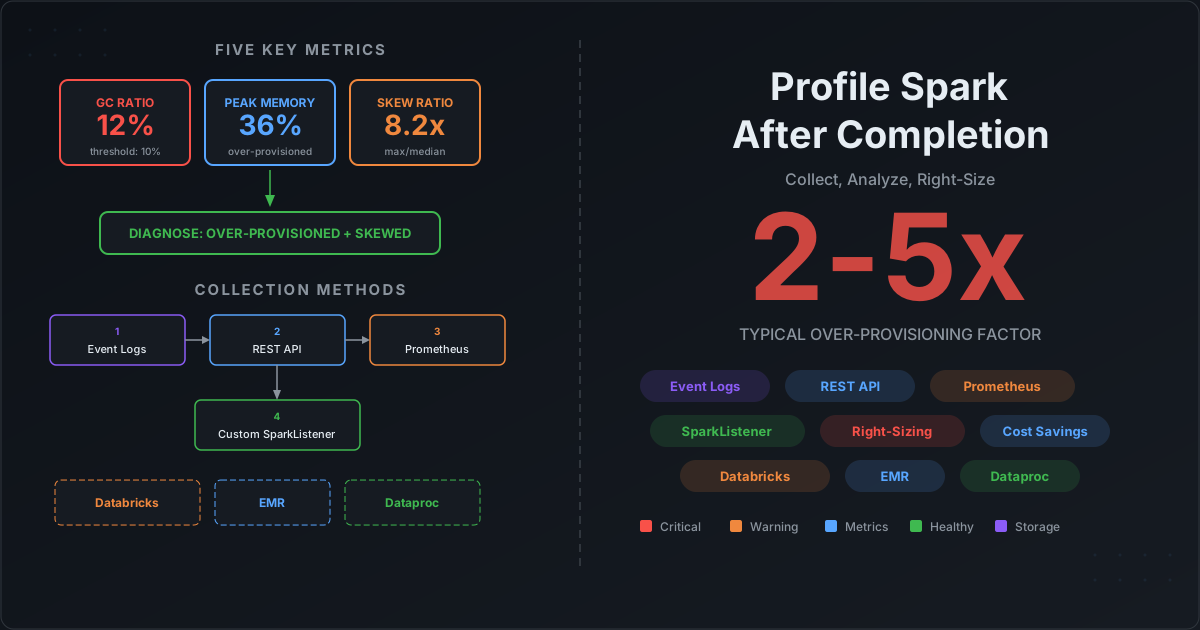
Most teams have no systematic way to answer the obvious follow-up questions: Was 50 executors the right number? Did we waste memory? Was there data skew? Should we use different instance types? They either overprovision "just in case" — burning 2-5x the needed budget — or reactively debug when jobs fail with OOM errors.
The root cause is not a lack of tooling. It is a data collection problem. Spark generates extraordinarily detailed metrics at every level — task, stage, executor, application — but those metrics vanish when the application terminates. If you did not capture them during or immediately after execution, they are gone.
This post solves that problem. We cover every method for collecting Spark profiling metrics, show exactly how to set them up on Databricks, EMR, and Dataproc, and then show you how to turn those metrics into right-sizing decisions with concrete formulas and thresholds.
The Five Metrics That Tell the Full Story
Before diving into collection methods, you need to know which numbers actually matter. Out of the hundreds of metrics Spark tracks, five tell you almost everything about whether your job is right-sized.
1. GC Time Ratio
gc_ratio = jvmGcTime / executorRunTime
| Range | Diagnosis |
|---|---|
| Under 5% | Healthy. Memory is sufficient. |
| 5-10% | Warning. Memory pressure building. Monitor trend. |
| Over 10% | Critical. Tasks spend significant time garbage collecting instead of computing. Increase spark.executor.memory or reduce spark.executor.cores. |
This is the single most important metric for memory sizing. When GC ratio exceeds 10%, every task is effectively paused for garbage collection multiple times — your job is running with one hand tied behind its back.
2. Peak Executor Memory
peak_memory = max(JVMHeapMemory) across all executors and stages
Compare this against spark.executor.memory. If peak usage is under 40% of allocated, you are over-provisioned. If over 90%, you are at OOM risk.
| Utilization | Diagnosis |
|---|---|
| Under 40% | Over-provisioned. Drop to a smaller instance type or reduce spark.executor.memory. |
| 40-85% | Healthy range. |
| Over 85% | Tight. Add headroom or risk OOM under data volume spikes. |
3. Task Duration Distribution (Skew Ratio)
skew_ratio = max(task_duration) / median(task_duration) -- per stage
| Ratio | Diagnosis |
|---|---|
| Under 2x | No significant skew. |
| 2-5x | Moderate skew. Investigate partition keys. |
| Over 5x | Severe skew. One partition is orders of magnitude larger. All executors wait for the straggler. Fix with salting, spark.sql.adaptive.skewJoin.enabled, or repartitioning. |
4. Disk Spill Bytes
total_disk_spill = sum(diskBytesSpilled) across all tasks
Any non-zero value means Spark ran out of execution memory for a sort, join, or aggregation and fell back to disk. This is a severe performance signal — disk I/O is 10-100x slower than memory.
| Value | Diagnosis |
|---|---|
| 0 bytes | Healthy. |
| Over 0 | Increase spark.executor.memory, reduce spark.executor.cores (fewer concurrent tasks per executor = more memory per task), or repartition to reduce per-partition data size. |
5. CPU Utilization Ratio
cpu_ratio = (executorCpuTime / 1e6) / executorRunTime
| Ratio | Diagnosis |
|---|---|
| Over 0.70 | CPU-bound. Healthy — compute is the bottleneck, not I/O. |
| 0.30-0.70 | Mixed. Some I/O wait or GC overhead. |
| Under 0.30 | I/O or GC bound. Tasks spend most of their time waiting — for shuffle data, GC pauses, or external I/O. |
Where These Metrics Live in Spark
Spark tracks metrics at four levels. Understanding the hierarchy is essential because different collection methods give you access to different levels.
Application (total wall clock, configuration)
  └── Job (duration, result)
        └── Stage (aggregated task metrics via accumulables)
              └── Task (per-task: executorRunTime, jvmGcTime, shuffleReadBytes,
                        peakExecutionMemory, diskBytesSpilled, cpuTime)
                  └── Executor Snapshot (JVMHeapMemory, GC counts, memory pools)
Task-level metrics are the most granular and the most valuable for profiling. They come from SparkListenerTaskEnd events in the event log. Stage-level metrics are aggregated sums across tasks. Application-level metrics are what you see in the Spark UI summary.
The key insight: most platform-managed monitoring (CloudWatch, Cloud Monitoring, Databricks system tables) only captures application-level or YARN-level metrics. For task-level detail — the metrics that actually diagnose problems — you need Spark event logs.
Collection Method 1: Spark Event Logs
This is the universal method that works on every platform. Spark event logs are newline-delimited JSON files containing every SparkListenerEvent — task completions, stage completions, executor metrics, SQL plans, everything.
Enabling Event Logs
# Core settings (add to spark-defaults.conf or spark-submit --conf)
spark.eventLog.enabled                     true
spark.eventLog.dir                         s3a://my-bucket/spark-event-logs/
spark.eventLog.compress                    true
spark.eventLog.compression.codec           zstd

# CRITICAL: Enable per-stage peak executor metrics (off by default!)
spark.eventLog.logStageExecutorMetrics     true

# Rolling logs (default in Spark 3.0+)
spark.eventLog.rolling.enabled             true
spark.eventLog.rolling.maxFileSize         128m
The logStageExecutorMetrics setting is the most commonly missed configuration. Without it, you lose the SparkListenerStageExecutorMetrics events that record peak JVM heap, GC counts, and memory pool usage per executor per stage — the data you need for memory right-sizing.
What Is Inside an Event Log
Each line is a JSON object with an Event field. The most valuable events for profiling:
| Event | Profiling Use |
|---|---|
SparkListenerTaskEnd | Per-task: executorRunTime, jvmGcTime, peakExecutionMemory, diskBytesSpilled, shuffleReadMetrics, shuffleWriteMetrics, inputMetrics |
SparkListenerStageCompleted | Stage-level aggregated accumulables: total run time, total GC, total spill, total shuffle |
SparkListenerStageExecutorMetrics | Peak JVMHeapMemory, OnHeapExecutionMemory, MinorGCTime, MajorGCTime per executor per stage |
SparkListenerExecutorMetricsUpdate | Heartbeat snapshots (~10s) of executor memory — builds time-series |
SparkListenerEnvironmentUpdate | The full Spark configuration used (executor memory, cores, instances) |
Parsing Event Logs with PySpark
You can analyze event logs from completed jobs using Spark itself — ideal for batch profiling across many applications:
from pyspark.sql.functions import *

# Read all event logs (works with rolling directories on S3/GCS/ADLS)
events = spark.read.text("s3a://my-bucket/spark-event-logs/application_*")

# Extract task-level metrics
tasks = events.filter(
    get_json_object("value", "$.Event") == "SparkListenerTaskEnd"
).select(
    get_json_object("value", "$.Stage ID").cast("int").alias("stage_id"),
    get_json_object("value", "$.Task Info.Executor ID").alias("executor_id"),
    get_json_object("value", "$.Task Metrics.Executor Run Time").cast("long").alias("run_time_ms"),
    get_json_object("value", "$.Task Metrics.Executor CPU Time").cast("long").alias("cpu_time_ns"),
    get_json_object("value", "$.Task Metrics.JVM GC Time").cast("long").alias("gc_time_ms"),
    get_json_object("value", "$.Task Metrics.Peak Execution Memory").cast("long").alias("peak_memory"),
    get_json_object("value", "$.Task Metrics.Memory Bytes Spilled").cast("long").alias("memory_spilled"),
    get_json_object("value", "$.Task Metrics.Disk Bytes Spilled").cast("long").alias("disk_spilled"),
    get_json_object("value",
        "$.Task Metrics.Shuffle Read Metrics.Remote Bytes Read").cast("long").alias("shuffle_remote_read"),
    get_json_object("value",
        "$.Task Metrics.Shuffle Read Metrics.Local Bytes Read").cast("long").alias("shuffle_local_read"),
    get_json_object("value",
        "$.Task Metrics.Shuffle Write Metrics.Shuffle Bytes Written").cast("long").alias("shuffle_write"),
    get_json_object("value",
        "$.Task Metrics.Input Metrics.Bytes Read").cast("long").alias("input_bytes"),
)

# Per-stage profiling summary
tasks.groupBy("stage_id").agg(
    count("*").alias("tasks"),
    expr("percentile_approx(run_time_ms, 0.5)").alias("p50_runtime_ms"),
    expr("percentile_approx(run_time_ms, 0.95)").alias("p95_runtime_ms"),
    max("run_time_ms").alias("max_runtime_ms"),
    avg("gc_time_ms").alias("avg_gc_ms"),
    expr("avg(gc_time_ms / run_time_ms)").alias("avg_gc_ratio"),
    sum("disk_spilled").alias("total_disk_spill"),
    max("peak_memory").alias("max_peak_memory"),
    sum("shuffle_remote_read").alias("total_shuffle_read"),
    sum("shuffle_write").alias("total_shuffle_write"),
).orderBy("stage_id").show(truncate=False)
Storage and Retention
Store event logs in cloud object storage with lifecycle policies:
Hot (0-14 days):    Standard storage — active profiling
Warm (14-90 days):  Infrequent Access / Nearline — ad-hoc investigation
Cold (90-365 days): Glacier / Coldline / Archive — compliance
Delete after 365 days
Size estimation: A medium ETL pipeline (5,000 tasks) produces ~100 MB uncompressed, ~10 MB with zstd. A large pipeline (50,000 tasks) produces ~1 GB uncompressed, ~100 MB compressed.
Collection Method 2: Spark History Server REST API
The History Server replays event logs and exposes structured profiling data through a REST API. This is the easiest method for automated profiling of completed jobs.
Key Endpoints
| Endpoint | Returns |
|---|---|
GET /api/v1/applications | List of all applications with start/end times |
GET /api/v1/applications/{id}/stages | All stages with duration, task counts, I/O |
GET /api/v1/applications/{id}/stages/{stageId}/taskSummary | Percentile distributions (P5, P25, P50, P75, P95) for runtime, GC, shuffle — gold for skew detection |
GET /api/v1/applications/{id}/allexecutors | All executors (including dead ones) with memory, GC, shuffle totals |
GET /api/v1/applications/{id}/stages/{stageId}/taskList | Individual task details — sort by runtime to find stragglers |
Automated Profiling Script
HISTORY_SERVER="http://localhost:18080"
APP_ID="app-20260319120000-0001"
BASE="${HISTORY_SERVER}/api/v1/applications/${APP_ID}"

# Dump all stages
curl -s "${BASE}/stages" | python3 -m json.tool > stages.json

# Get task summary with quantiles for each stage (skew detection)
for STAGE_ID in $(python3 -c "
import json
stages = json.load(open('stages.json'))
for s in stages:
    print(s['stageId'])
"); do
    curl -s "${BASE}/stages/${STAGE_ID}/0/taskSummary?\
quantiles=0.05,0.25,0.5,0.75,0.95,0.99" > "stage_${STAGE_ID}_summary.json"
done

# Get all executors (includes peak memory metrics)
curl -s "${BASE}/allexecutors" | python3 -m json.tool > executors.json
The taskSummary endpoint is the most powerful profiling tool in the REST API. It returns percentile distributions for executorRunTime, jvmGcTime, gettingResultTime, schedulerDelay, shuffleReadSize, shuffleWriteSize, memoryBytesSpilled, and diskBytesSpilled — in a single call, without fetching every individual task.
Collection Method 3: Spark Metrics System (Prometheus)
Spark's built-in metrics system exports executor, driver, and JVM metrics through configurable sinks. Since Spark 3.0, a Prometheus endpoint is available.
Enabling Prometheus
# spark-defaults.conf or --conf
spark.ui.prometheus.enabled                                        true
spark.metrics.conf.*.sink.prometheusServlet.class=org.apache.spark.metrics.sink.PrometheusServlet
spark.metrics.conf.*.sink.prometheusServlet.path=/metrics/prometheus
spark.metrics.conf.*.source.jvm.class=org.apache.spark.metrics.source.JvmSource
This exposes two endpoints while the application runs:
http://driver:4040/metrics/prometheus/— Driver-side Dropwizard metricshttp://driver:4040/metrics/executors/prometheus/— Per-executor metrics
The Ephemeral Problem and How to Solve It
These endpoints vanish when the application terminates. For post-job analysis, you must persist the data during runtime:
Option A: Prometheus scraping — Configure Prometheus to scrape the endpoints every 15s. After the job ends, query historical data with PromQL:
# prometheus.yml
scrape_configs:
  - job_name: 'spark-driver'
    metrics_path: '/metrics/prometheus/'
    scrape_interval: 15s
    static_configs:
      - targets: ['driver-host:4040']
Option B: CSV Sink — Write metrics to local files for offline analysis:
*.sink.csv.class=org.apache.spark.metrics.sink.CSVSink
*.sink.csv.period=10
*.sink.csv.unit=seconds
*.sink.csv.directory=/tmp/spark-metrics
Option C: Graphite/StatsD Sink — Push to a time-series database:
*.sink.graphite.class=org.apache.spark.metrics.sink.GraphiteSink
*.sink.graphite.host=graphite.example.com
*.sink.graphite.port=2003
*.sink.graphite.period=10
*.sink.graphite.unit=seconds
*.sink.graphite.prefix=spark.${spark.app.name}
Limitation
The metrics system provides executor-level aggregates (cumulative counters like succeededTasks, shuffleBytesWritten), not per-task breakdowns. For task-level detail, you need event logs or a custom SparkListener.
Collection Method 4: Custom SparkListener
For teams that want to push specific metrics to a custom store (Postgres, Delta Lake, Iceberg, ClickHouse), a SparkListener implementation gives full control.
Key Callbacks
class ProfilingListener extends SparkListener {
  override def onTaskEnd(taskEnd: SparkListenerTaskEnd): Unit = {
    val metrics = taskEnd.taskMetrics
    val info = taskEnd.taskInfo
    // Access: metrics.executorRunTime, metrics.jvmGCTime,
    //         metrics.peakExecutionMemory, metrics.diskBytesSpilled,
    //         metrics.shuffleReadMetrics.totalBytesRead,
    //         metrics.shuffleWriteMetrics.bytesWritten,
    //         metrics.inputMetrics.bytesRead
    // Write to your metrics store
  }

  override def onStageCompleted(stageCompleted: SparkListenerStageCompleted): Unit = {
    val info = stageCompleted.stageInfo
    // Access: info.taskMetrics (aggregated), info.submissionTime,
    //         info.completionTime, info.numTasks, info.failureReason
  }
}
Register it via:
spark.extraListeners=com.example.ProfilingListener
The spark-measure library (open-source, by Luca Canali at CERN) provides a production-ready SparkListener that collects task and stage metrics into DataFrames — no custom code needed:
// Add spark-measure dependency, then:
val stageMetrics = ch.cern.sparkmeasure.StageMetrics(spark)
stageMetrics.runAndMeasure {
  // your Spark code here
}
stageMetrics.printReport()
Platform-Specific: Databricks
Databricks provides the richest native profiling ecosystem through Unity Catalog system tables. However, there is a critical gap: system tables do not expose Spark task-level metrics (GC time per task, shuffle per executor, disk spill per stage). For that granularity, you still need Spark event logs.
What System Tables Provide
| System Table | Metrics | Granularity |
|---|---|---|
system.compute.node_timeline | CPU utilization %, memory utilization %, network bytes | Per node, per minute |
system.lakeflow.job_run_timeline | setup, queue, execution, cleanup durations, result state | Per job run |
system.lakeflow.job_task_run_timeline | Same durations at task level | Per task run |
system.billing.usage | DBU consumption per job, cluster, user | Hourly |
system.billing.list_prices | Historical SKU pricing | Per price change |
system.query.history | Query duration, rows read/produced, bytes read, spill, shuffle, pruned files, I/O cache % | Per SQL query (SQL warehouses + serverless only) |
Identify Under-Utilized Clusters
SELECT
  nt.cluster_id,
  c.cluster_name,
  c.worker_node_type,
  ROUND(AVG(nt.cpu_utilization_percent), 1) AS avg_cpu_pct,
  ROUND(MAX(nt.cpu_utilization_percent), 1) AS peak_cpu_pct,
  ROUND(AVG(nt.memory_utilization_percent), 1) AS avg_mem_pct
FROM system.compute.node_timeline nt
JOIN system.compute.clusters c
  ON nt.cluster_id = c.cluster_id
WHERE nt.timestamp >= current_date() - INTERVAL 14 DAYS
GROUP BY nt.cluster_id, c.cluster_name, c.worker_node_type
HAVING avg_cpu_pct < 20
ORDER BY avg_cpu_pct;
If average CPU is under 20%, the cluster is massively over-provisioned — either too many nodes or too large an instance type.
Cost Per Job with Dollar Amounts
SELECT
  u.usage_metadata.job_id,
  u.usage_metadata.job_name,
  SUM(u.usage_quantity) AS total_dbus,
  SUM(u.usage_quantity * p.pricing.effective_list.default) AS dollar_cost
FROM system.billing.usage u
LEFT JOIN system.billing.list_prices p
  ON u.sku_name = p.sku_name AND u.cloud = p.cloud
  AND u.usage_start_time >= p.price_start_time
  AND (p.price_end_time IS NULL OR u.usage_start_time < p.price_end_time)
WHERE u.usage_metadata.job_id IS NOT NULL
  AND u.usage_date >= current_date() - INTERVAL 30 DAYS
GROUP BY u.usage_metadata.job_id, u.usage_metadata.job_name
ORDER BY dollar_cost DESC;
Cost of Failed Jobs (Waste)
SELECT
  j.name AS job_name,
  COUNT(*) AS failed_runs,
  SUM(jrt.run_duration_seconds) / 3600 AS total_wasted_hours,
  SUM(b.dollar_cost) AS total_wasted_dollars
FROM system.lakeflow.job_run_timeline jrt
JOIN system.lakeflow.jobs j ON jrt.job_id = j.job_id
LEFT JOIN (
  SELECT usage_metadata.job_run_id AS run_id,
    SUM(usage_quantity * p.pricing.effective_list.default) AS dollar_cost
  FROM system.billing.usage u
  LEFT JOIN system.billing.list_prices p
    ON u.sku_name = p.sku_name AND u.cloud = p.cloud
    AND u.usage_start_time >= p.price_start_time
    AND (p.price_end_time IS NULL OR u.usage_start_time < p.price_end_time)
  GROUP BY usage_metadata.job_run_id
) b ON jrt.run_id = b.run_id
WHERE jrt.result_state = 'FAILED'
  AND jrt.period_start_time >= current_date() - INTERVAL 30 DAYS
GROUP BY j.name
ORDER BY total_wasted_dollars DESC;
Databricks Ganglia Replacement
Since DBR 13.3, Ganglia has been replaced by native compute metrics visible in the Metrics tab of the cluster page. This provides CPU, memory, network, and Spark task/shuffle metrics at minute granularity — available for up to 30 days.
The Spark Task-Level Gap
System tables give you job-level and node-level metrics. For task-level diagnosis (GC per task, shuffle per executor, spill per stage, skew detection), you need:
- Spark event logs — Enable
spark.eventLog.enabled=truewith cluster log delivery or a dedicated event log directory - Overwatch (Databricks Labs, open-source) — Parses event logs into queryable Delta tables with stage and task-level metrics. In maintenance mode since system tables launched, but still the only way to get this data natively on Databricks
Platform-Specific: AWS EMR
Persistent Spark History Server
EMR provides a managed persistent UI that survives cluster termination — but it only works when event logs are in HDFS (the default). If you set spark.eventLog.dir to S3, the managed UI will not function.
Recommended: Write event logs to S3 and run a dedicated History Server:
[{
  "Classification": "spark-defaults",
  "Properties": {
    "spark.eventLog.enabled": "true",
    "spark.eventLog.dir": "s3a://my-bucket/spark-event-logs/",
    "spark.eventLog.compress": "true",
    "spark.eventLog.compression.codec": "zstd",
    "spark.eventLog.logStageExecutorMetrics": "true"
  }
}]
Then run a single-node EMR cluster as a persistent History Server:
aws emr create-cluster \
  --name "Persistent Spark History Server" \
  --release-label emr-7.1.0 \
  --applications Name=Spark \
  --instance-type m5.large --instance-count 1 \
  --configurations '[{
    "Classification": "spark-defaults",
    "Properties": {
      "spark.history.fs.logDirectory": "s3a://my-bucket/spark-event-logs/",
      "spark.history.retainedApplications": "200",
      "spark.history.fs.cleaner.enabled": "true",
      "spark.history.fs.cleaner.maxAge": "30d"
    }
  }]' \
  --use-default-roles
CloudWatch Metrics (Cluster-Level)
EMR publishes YARN metrics to CloudWatch under the AWS/ElasticMapReduce namespace. These are cluster-level only:
| CloudWatch Metric | What It Tells You |
|---|---|
MemoryAllocatedMB / MemoryTotalMB | Memory utilization. Low ratio = over-provisioned. |
ContainerPending | Non-zero = resource starvation. Scale up. |
YARNMemoryAvailablePercentage | Inverse of utilization. Consistently over 60% = waste. |
IsIdle | 1 = no tasks running. Pay attention to idle time between steps. |
AppsCompleted / AppsFailed | Job success rate tracking. |
aws cloudwatch get-metric-statistics \
  --namespace AWS/ElasticMapReduce \
  --metric-name YARNMemoryAvailablePercentage \
  --dimensions Name=JobFlowId,Value=j-XXXXXXXXXXXXX \
  --start-time 2026-03-18T00:00:00Z \
  --end-time 2026-03-19T00:00:00Z \
  --period 300 --statistics Average,Minimum
Capture YARN Metrics Before Termination
The YARN ResourceManager API (http://master:8088/ws/v1/cluster/apps) provides rich per-application metrics (memorySeconds, vcoreSeconds, elapsedTime) but is only available while the cluster runs. Capture it via a shutdown action:
#!/bin/bash
# bootstrap-shutdown-capture.sh -- runs on master before termination
CLUSTER_ID=$(python3 -c "import json; print(json.load(open('/mnt/var/lib/info/job-flow.json'))['jobFlowId'])")
mkdir -p /mnt/var/lib/instance-controller/public/shutdown-actions/
cat > /mnt/var/lib/instance-controller/public/shutdown-actions/capture.sh << 'SCRIPT'
curl -s http://localhost:8088/ws/v1/cluster/apps?applicationTypes=SPARK | \
  aws s3 cp - s3://my-bucket/yarn-snapshots/${CLUSTER_ID}/apps.json
curl -s http://localhost:8088/ws/v1/cluster/metrics | \
  aws s3 cp - s3://my-bucket/yarn-snapshots/${CLUSTER_ID}/metrics.json
SCRIPT
chmod +x /mnt/var/lib/instance-controller/public/shutdown-actions/capture.sh
EMR Log Structure in S3
When using --log-uri s3://my-logs/, EMR archives:
s3://my-logs/<cluster-id>/
  ├── steps/<step-id>/stderr.gz    # Spark driver output
  ├── containers/<app-id>/
  │     └── <container-id>/stderr.gz  # Executor logs (GC, OOM)
  └── node/<instance-id>/applications/  # Daemon logs
Platform-Specific: GCP Dataproc
Persistent History Server on GCS
Create a dedicated single-node cluster as a persistent History Server:
# Configure ephemeral clusters to write event logs to GCS
gcloud dataproc clusters create my-job-cluster \
  --region=us-central1 \
  --num-workers=4 \
  --properties="\
spark:spark.eventLog.enabled=true,\
spark:spark.eventLog.dir=gs://my-spark-logs/event-logs/,\
spark:spark.eventLog.logStageExecutorMetrics=true" \
  --enable-component-gateway

# Create a persistent History Server reading from the same GCS bucket
gcloud dataproc clusters create phs-cluster \
  --region=us-central1 --single-node \
  --properties="spark:spark.history.fs.logDirectory=gs://my-spark-logs/event-logs/" \
  --enable-component-gateway
The PHS cluster stays running and provides the Spark History UI through the Component Gateway — accessible after ephemeral clusters are deleted.
Cloud Monitoring Metrics
Dataproc publishes YARN metrics under dataproc.googleapis.com/cluster/:
| Metric | Description |
|---|---|
yarn/memory_fraction | YARN memory utilization (0.0-1.0) |
yarn/container_count (state=pending) | Resource starvation indicator |
yarn/apps (status=completed/failed) | Job tracking |
job/yarn_memory_seconds | Memory-seconds per job — primary cost metric |
job/yarn_vcore_seconds | vCore-seconds per job |
gcloud monitoring time-series list \
  --filter='metric.type="dataproc.googleapis.com/cluster/yarn/memory_fraction"
    AND resource.labels.cluster_name="my-cluster"' \
  --interval-start-time="2026-03-18T00:00:00Z" \
  --interval-end-time="2026-03-19T00:00:00Z"
Dataproc Jobs API (Survives Cluster Deletion)
Unlike YARN ResourceManager, the Dataproc Jobs API retains metadata indefinitely:
gcloud dataproc jobs describe JOB_ID --region=us-central1 --format=json
This returns yarnApplications[].memoryMbSeconds and vcoreSeconds — the primary cost metrics — plus full status history with timestamps for PENDING, SETUP_DONE, RUNNING, and DONE transitions.
BigQuery Audit Logs
Export Dataproc audit logs to BigQuery for historical SQL analysis:
gcloud logging sinks create dataproc-to-bq \
  "bigquery.googleapis.com/projects/my-project/datasets/dataproc_logs" \
  --log-filter='resource.type="cloud_dataproc_job"' \
  --use-partitioned-tables
Then query job history with SQL:
SELECT
  JSON_EXTRACT_SCALAR(protopayload_auditlog.response,
    '$.job.reference.jobId') AS job_id,
  CAST(JSON_EXTRACT_SCALAR(protopayload_auditlog.response,
    '$.job.yarnApplications[0].memoryMbSeconds') AS INT64) AS memory_mb_seconds,
  CAST(JSON_EXTRACT_SCALAR(protopayload_auditlog.response,
    '$.job.yarnApplications[0].vcoreSeconds') AS INT64) AS vcore_seconds
FROM `my-project.dataproc_logs.cloudaudit_googleapis_com_activity`
WHERE resource.type = 'cloud_dataproc_job'
  AND DATE(timestamp) >= '2026-03-01'
ORDER BY memory_mb_seconds DESC;
Right-Sizing from Actual Metrics
Once you have the data, here is how to turn it into configuration changes.
Memory Right-Sizing Formula
recommended_executor_memory = peak_JVM_heap × 1.15
container_memory = recommended_executor_memory + max(384 MB, 0.1 × recommended_executor_memory)
Worked example:
Observed: peak JVM heap = 5.8 GB across all executors
Current:  spark.executor.memory = 16g

Recommended: 5.8 × 1.15 = 6.67 → round to 7g
Overhead:    max(384 MB, 0.1 × 7g) = 0.7g
Container:   7.7g total

Savings per executor: 16g - 7g = 9g → enables smaller instance type
If your current instance has 64 GB and you are using 16g per executor (3 executors per node + overhead), dropping to 7g per executor might let you switch from r5.2xlarge ($0.504/hr) to m5.2xlarge ($0.384/hr) — 24% cost reduction.
Executor Count Right-Sizing
executor_utilization = total_task_run_time / (num_executors × cores × wall_clock_time)
optimal_executors = ceil(total_task_run_time / (cores × target_wall_clock))
If utilization is under 20%, you are wasting over 80% of compute capacity. Enable dynamic allocation:
spark.dynamicAllocation.enabled               true
spark.dynamicAllocation.minExecutors           2
spark.dynamicAllocation.maxExecutors           <optimal from formula>
spark.dynamicAllocation.executorIdleTimeout    60s
Skew Remediation Decision
| Skew Ratio (max/median) | Action |
|---|---|
| Under 3x | No action needed. |
| 3-10x | Enable AQE skew join: spark.sql.adaptive.skewJoin.enabled=true with skewedPartitionThresholdInBytes=256m and skewedPartitionFactor=5. |
| Over 10x | AQE alone may not suffice. Investigate the partition key. Consider salting, two-phase aggregation, or broadcast join for the skewed table. |
Post-Job Profiling Thresholds Cheat Sheet
| Metric | How to Compute | Healthy | Warning | Action Required |
|---|---|---|---|---|
| GC Ratio | jvmGcTime / executorRunTime | Under 5% | 5-10% | Over 10%: increase memory or reduce cores |
| CPU Ratio | cpuTime / (runTime × 1e6) | Over 0.70 | 0.30-0.70 | Under 0.30: I/O or GC bound |
| Skew Ratio | max(taskDuration) / median(taskDuration) per stage | Under 2x | 2-5x | Over 5x: salt, AQE, or repartition |
| Memory Util | peakHeap / allocatedMemory | 50-85% | Under 40%: waste | Over 90%: OOM risk |
| Disk Spill | sum(diskBytesSpilled) | 0 | Any value | Over 1 GB: urgent — increase memory |
| Shuffle Locality | localBytes / (local + remote) | Over 50% | 20-50% | Under 20%: network bottleneck |
| Scheduling Delay | wallClock - runTime - deserialize - serialize | Under 100ms | 100ms-1s | Over 1s: resource contention |
| Executor Util | totalTaskTime / (executors × cores × wallClock) | Over 50% | 20-50% | Under 20%: massive over-provisioning |
Platform Comparison: What You Get Where
| Metric Level | Spark Event Logs | Databricks System Tables | EMR CloudWatch | Dataproc Cloud Monitoring |
|---|---|---|---|---|
| Task-level (GC, shuffle, spill per task) | Yes | No | No | No |
| Stage-level (aggregated metrics) | Yes | No | No | No |
| Executor-level (peak memory, GC counts) | Yes | No | No | No |
| Job-level (duration, result) | Yes | Yes (lakeflow) | Yes (steps) | Yes (jobs API) |
| Node-level (CPU, memory %) | No | Yes (node_timeline) | Yes (CloudWatch) | Yes (Cloud Monitoring) |
| Cost (dollars per job) | No | Yes (billing.usage) | No (manual calc) | No (manual calc) |
| SQL query metrics (rows, bytes, spill) | Via SQL events | Yes (query.history) | No | No |
| Post-termination availability | Indefinite (object storage) | 365 days | 63 days (5-min), 15 months (1-hr) | ~6 weeks (1-min), ~6 months (10-min) |
The takeaway: Spark event logs are the only universal source of task-level profiling data. Platform monitoring gives you node utilization and cost, but cannot tell you why a stage was slow or which executor had GC problems. You need both.
Building the Profiling Pipeline
For teams managing dozens or hundreds of daily jobs, manual profiling does not scale. Here is the architecture for automated profiling:
Spark Jobs (Databricks / EMR / Dataproc)
    │
    ├── Event Logs → S3/GCS/ADLS
    │                    │
    │                    ▼
    │              Event Log Parser
    │              (Spark job or Python)
    │                    │
    │                    ▼
    │              Metrics Store
    │              (Delta / Iceberg / ClickHouse)
    │
    ├── Platform Metrics → System Tables / CloudWatch / Cloud Monitoring
    │                    │
    │                    ▼
    │              Join on job_id / cluster_id
    │
    └── Alerts
         ├── GC ratio > 10% → Slack notification
         ├── Disk spill > 1 GB → Slack notification
         ├── Skew ratio > 5x → Slack notification
         ├── Memory util < 40% → Right-sizing recommendation
         └── Executor util < 20% → Over-provisioning alert
The parser runs on a schedule (daily), reads new event logs, extracts the five key metrics per stage, and writes them to a metrics table. A dashboard shows trends over time. Alerts fire when thresholds are breached.
How Cazpian Handles This
The profiling workflow described above requires stitching together event logs, platform APIs, History Servers, and custom parsers — across every cluster, every platform, every job. Most teams never build this pipeline. They either guess at configurations or overprovision by default.
Cazpian eliminates this entirely.
Immediate Metrics After Every Job and Query
When a Spark job or SQL query completes on Cazpian, profiling metrics are immediately available — no event log parsing, no History Server setup, no custom SparkListener. Every metric covered in this post is collected automatically:
- GC ratio per stage and per executor
- Peak memory utilization against allocated memory
- Task duration distribution with skew ratio detection
- Disk spill totals per stage
- CPU utilization ratio (compute vs I/O wait)
- Shuffle metrics — bytes read/written, local vs remote ratio
- Cost — actual dollar spend per job
In the Cazpian SQL editor, compute metrics appear alongside query results. For batch pipelines, the job dashboard shows per-stage breakdowns immediately after completion. No digging through Spark UI. No waiting for event log ingestion.
AI-Powered Recommendations
Raw metrics require expertise to interpret. Cazpian's AI analyzes the collected metrics and provides actionable recommendations:
- Bottleneck identification — pinpoints whether a job is memory-bound, I/O-bound, skew-bound, or compute-bound
- Right-sizing suggestions — specific executor memory and core count changes based on actual peak usage, not guesswork
- Skew remediation — identifies skewed stages and recommends salting, AQE tuning, or repartitioning strategies
- Spill elimination — traces disk spill to the responsible stage and suggests the minimum memory increase to eliminate it
- Cost optimization — correlates resource utilization with spend and recommends instance type changes with projected savings
Instead of a senior engineer spending 30 minutes interpreting event log data and computing right-sizing formulas manually, the AI delivers the diagnosis and fix in seconds.
The Visibility Gap on Other Platforms
On Databricks, task-level metrics require parsing event logs or running Overwatch. On EMR, you need a self-hosted History Server and shutdown scripts to capture YARN data. On Dataproc, you piece together Cloud Monitoring, Jobs API, and audit logs. On all three, correlating metrics with cost requires joining billing data manually.
Cazpian treats profiling as a first-class feature, not an afterthought. Every metric is collected, correlated with cost, and surfaced with AI-driven recommendations — making right-sizing a routine part of every job, not a quarterly optimization project.
What Profiling Cannot Tell You
Profiling completed jobs tells you what happened. It does not tell you:
- What the optimal partition count is — you need to experiment with
spark.sql.shuffle.partitionsand re-measure - Whether a broadcast join would help — you need to check table sizes and try
spark.sql.autoBroadcastJoinThreshold - Whether your data format is optimal — Parquet vs ORC, compression codec, row group size require A/B testing
- Whether your query plan is efficient — use
EXPLAIN FORMATTEDbefore the job runs, not after
Profiling is the diagnostic step. It tells you where to look. The fix still requires engineering judgment and experimentation.
Next Steps
- Enable event logging with
spark.eventLog.logStageExecutorMetrics=trueon every cluster. This is the single highest-leverage change. - Set up a persistent History Server (self-hosted on S3/GCS) if you use EMR or Dataproc. On Databricks, enable cluster log delivery.
- Run the PySpark event log parser on your last 7 days of jobs. Identify the top 3 jobs by GC ratio and disk spill.
- Apply right-sizing formulas to your top 5 most expensive jobs. Start with memory right-sizing — it is the safest change with the highest ROI.
- Automate with a daily profiling pipeline that parses event logs and alerts on threshold breaches.
The difference between a well-profiled Spark deployment and an unmonitored one is typically 2-5x in compute cost. The metrics are already there. You just need to collect them.