Databricks System Tables: The Observability Gap — What They Expose vs What You Actually Need for Cost Control

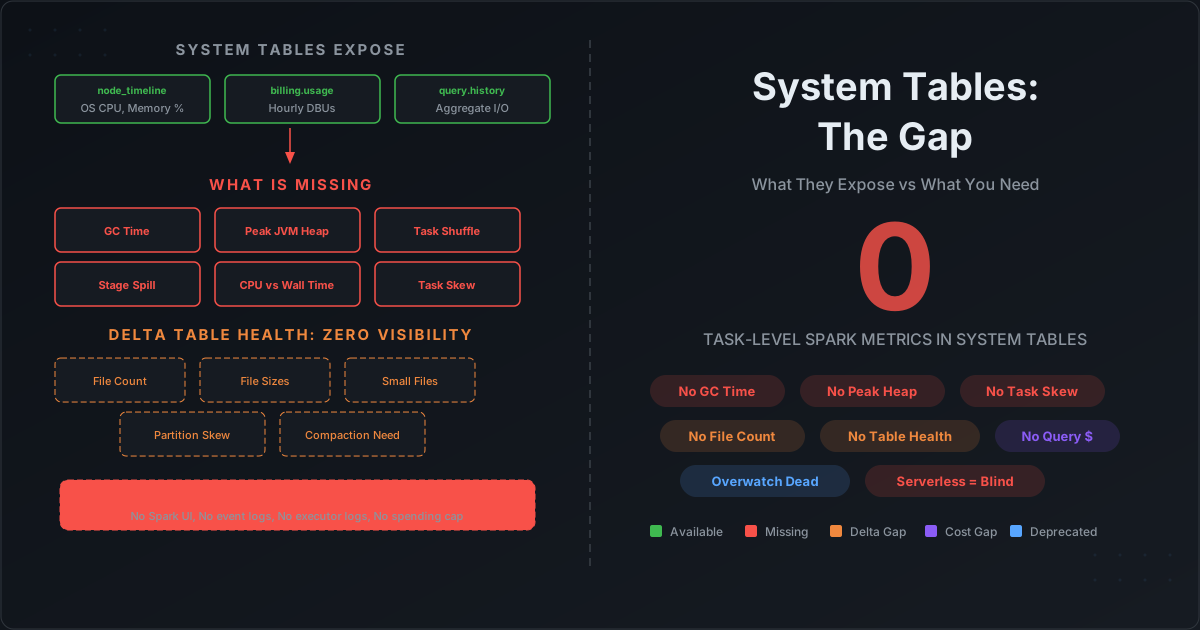
Databricks system tables look comprehensive on paper. Sixteen tables across ten schemas. Billing, compute, jobs, queries, lineage, audit. When Databricks deprecated Overwatch and pointed everyone to system tables, the message was clear: this is the future of observability.
But if you have ever tried to answer these questions using only system tables, you already know the gap:
- Why is my job's GC time at 15%? (System tables do not track GC time.)
- Which stage is spilling to disk? (System tables do not track per-stage spill.)
- Which executor is the memory bottleneck? (System tables do not track executor-level JVM metrics.)
- How many files does my Delta table have? Is it healthy? (System tables do not track Delta table physical metrics.)
- What did my serverless job's infrastructure look like? (System tables do not populate
node_timelinefor serverless.)
This post documents exactly what Databricks system tables contain — column by column — and exactly what is missing. Every claim is verifiable against Databricks' own documentation.
What System Tables Actually Contain
Databricks exposes system tables under the system catalog in Unity Catalog. Here are the tables relevant to compute observability and cost control, with their exact schemas.
system.compute.node_timeline — Per-Node Hardware Metrics
This is the closest thing to infrastructure monitoring in system tables. It records OS-level metrics at per-node, per-minute granularity.
| Column | Type | Description |
|---|---|---|
account_id | string | Account ID |
workspace_id | string | Workspace ID |
cluster_id | string | Cluster ID |
instance_id | string | Cloud instance ID (e.g., i-1234a6c12a2681234) |
start_time | timestamp | Record start (UTC) |
end_time | timestamp | Record end (UTC) |
driver | boolean | Whether this is the driver node |
cpu_user_percent | double | CPU time in userland (%) |
cpu_system_percent | double | CPU time in kernel (%) |
cpu_wait_percent | double | CPU time waiting for I/O (%) |
mem_used_percent | double | OS memory used (%) — includes all processes |
mem_swap_percent | double | Memory swap usage (%) |
network_sent_bytes | bigint | Bytes sent over network |
network_received_bytes | bigint | Bytes received from network |
disk_free_bytes_per_mount_point | map | Free disk by mount point |
node_type | string | Cloud instance type |
Retention: 90 days. Scope: All-purpose and jobs compute only. Does NOT include serverless compute or SQL warehouses.
What this tells you: OS-level CPU, memory, network, and disk per node per minute.
What this does NOT tell you: Anything about Spark. No JVM heap. No GC time. No execution memory vs storage memory. No per-executor breakdown. The mem_used_percent includes all OS processes — it cannot distinguish between Spark execution memory, cached data, and background daemons.
system.billing.usage — DBU Consumption
The billing table records hourly DBU consumption with rich metadata about what consumed the DBUs.
| Column | Type | Key Detail |
|---|---|---|
sku_name | string | SKU name (e.g., STANDARD_ALL_PURPOSE_COMPUTE) |
usage_quantity | decimal | DBUs consumed |
usage_start_time / usage_end_time | timestamp | Always 1-hour windows |
usage_metadata.cluster_id | string | Populated for classic compute. NULL for serverless. |
usage_metadata.node_type | string | Instance type. NULL for serverless. |
usage_metadata.job_id | string | For job compute and serverless jobs. NULL for all-purpose compute. |
usage_metadata.job_run_id | string | Same scope as job_id |
usage_metadata.warehouse_id | string | For SQL warehouses |
usage_metadata.notebook_id | string | For serverless notebooks |
product_features.is_serverless | boolean | Whether this is serverless usage |
identity_metadata.run_as | string | User who ran the workload |
Retention: Full account history. Granularity: Metered per-second, aggregated into hourly records.
Critical limitations:
- No per-query cost. There is no
statement_idforeign key. You cannot join billing toquery.historyto get exact DBU cost per query. The best you can do is proportional allocation within an hourly window — which is an approximation. - No cost attribution for all-purpose compute. When multiple users run notebooks on a shared cluster,
usage_metadata.job_idis NULL. There is no way to attribute the hourly DBU cost to individual workloads. - Serverless has no infrastructure visibility.
cluster_idandnode_typeare both NULL. You know how many DBUs were consumed but not what hardware ran your workload.
system.lakeflow.job_run_timeline — Job Execution Data
| Column | Type | Description |
|---|---|---|
job_id | string | Job ID |
run_id | string | Run ID |
period_start_time / period_end_time | timestamp | Run or hourly slice |
result_state | string | SUCCEEDED, FAILED, CANCELLED, etc. |
setup_duration_seconds | long | Time in setup phase |
queue_duration_seconds | long | Time queued |
execution_duration_seconds | long | Time executing |
cleanup_duration_seconds | long | Time in cleanup |
trigger_type | string | CRON, CONTINUOUS, ONETIME, etc. |
compute_ids | array | Cluster IDs used |
Retention: 365 days. Runs exceeding 1 hour are sliced into multiple rows aligned to clock-hour boundaries.
What this tells you: Job-level duration breakdown (setup, queue, execution, cleanup) and success/failure status.
What this does NOT tell you: Anything about Spark stages, tasks, shuffle, spill, or GC within the job. A 2-hour job that spent 90 minutes on a single skewed stage looks identical to a healthy 2-hour job.
system.query.history — SQL Query Metrics
This is the richest observability table, but it only covers SQL warehouses and serverless compute.
| Column | Type | Description |
|---|---|---|
statement_id | string | Unique query ID |
statement_text | string | Full SQL text |
execution_status | string | FINISHED, FAILED, CANCELED |
compute.type | string | WAREHOUSE or SERVERLESS_COMPUTE |
total_duration_ms | bigint | Total execution time |
execution_duration_ms | bigint | Time executing |
compilation_duration_ms | bigint | Time optimizing |
waiting_for_compute_duration_ms | bigint | Time waiting for compute |
waiting_at_capacity_duration_ms | bigint | Time queued |
total_task_duration_ms | bigint | Sum of all Spark task durations |
read_bytes | bigint | Total data read |
read_rows | bigint | Total rows read |
read_files | bigint | Files read after pruning |
pruned_files | bigint | Files eliminated by pruning |
read_partitions | bigint | Partitions read |
shuffle_read_bytes | bigint | Shuffle data over network |
spilled_local_bytes | bigint | Data spilled to disk |
written_bytes / written_rows / written_files | bigint | Output metrics |
read_io_cache_percent | int | IO cache hit rate |
from_result_cache | boolean | Whether result was cached |
Retention: 365 days. Scope: SQL warehouses and serverless compute only. Does NOT cover classic all-purpose or job clusters.
What this tells you: Query-level I/O, timing, shuffle reads, and spill — useful for identifying expensive queries.
What this does NOT tell you:
- No GC time. The single most important metric for memory right-sizing is not captured.
- No shuffle write bytes. Only shuffle reads are recorded — you cannot measure shuffle amplification.
- No per-stage breakdown. A query that scans 10 GB but spills 5 GB on one stage looks like a single number. You cannot identify which operator caused the spill.
- No peak memory per query. You cannot determine whether a query was close to OOM.
- No execution plan. You cannot detect plan regressions programmatically. There is no
system.query.profilestable — the Query Profile is UI-only. - No per-query DBU cost. There is no cost column. You must approximate by joining with hourly billing.
The Metrics That Are Completely Absent
Here is the systematic comparison. On the left: what Spark tracks internally via SparkListenerTaskEnd events. On the right: whether it appears in any system table.
Per-Executor JVM Metrics
Spark tracks these per executor via heartbeats and stage completion events:
| Metric | Available in System Tables? |
|---|---|
JVMHeapMemory (peak heap usage) | No |
JVMOffHeapMemory (peak off-heap) | No |
MinorGCCount / MinorGCTime | No |
MajorGCCount / MajorGCTime | No |
OnHeapExecutionMemory (peak) | No |
OffHeapExecutionMemory (peak) | No |
OnHeapStorageMemory (peak) | No |
node_timeline provides mem_used_percent at the OS level — but this includes all processes, cannot distinguish heap from off-heap, and cannot separate Spark execution memory from storage memory. It is the wrong metric for memory right-sizing.
Per-Task Spark Metrics
Every SparkListenerTaskEnd event contains a TaskMetrics object with:
| Metric | Available in System Tables? |
|---|---|
executorRunTime (wall clock per task) | No |
executorCpuTime (CPU time per task) | No |
jvmGCTime (GC time per task) | No |
peakExecutionMemory | No |
diskBytesSpilled | Aggregate only in query.history |
memoryBytesSpilled | No |
shuffleReadMetrics.remoteBytesRead | Aggregate only in query.history |
shuffleReadMetrics.localBytesRead | No |
shuffleReadMetrics.fetchWaitTime | No |
shuffleWriteMetrics.bytesWritten | No |
shuffleWriteMetrics.writeTime | No |
inputMetrics.bytesRead | Aggregate only in query.history |
resultSerializationTime | No |
taskLocality (PROCESS_LOCAL, NODE_LOCAL, etc.) | No |
Every metric in this table is available in Spark event logs and the Spark UI. None of them appear in system tables. The entire TaskMetrics object from SparkListenerTaskEnd is absent from the system.compute namespace.
What This Means for Cost Control
Without these metrics, you cannot:
- Diagnose GC pressure — you do not know if executors are spending 15% of runtime garbage collecting (the #1 signal to increase memory)
- Detect data skew — you cannot see per-task duration distributions to find straggler tasks
- Identify spill sources — you see aggregate spill per query but not which stage or operator caused it
- Right-size executor memory — you do not know peak JVM heap usage, so you cannot calculate
recommended_memory = peak_heap * 1.15 - Distinguish I/O-bound from CPU-bound tasks — you cannot compute
cpuTime / runTimeper task - Measure shuffle efficiency — you have shuffle read bytes but not local vs remote ratio or fetch wait time
These are the exact metrics that drive right-sizing formulas. System tables give you the bill. They do not give you the data to reduce it.
The Delta Table Health Blind Spot
This gap is less discussed but equally impactful. Databricks system tables provide zero visibility into Delta table physical health.
What information_schema.TABLES Contains
The INFORMATION_SCHEMA.TABLES view has 15 columns:
TABLE_CATALOG, TABLE_SCHEMA, TABLE_NAME, TABLE_TYPE,
IS_INSERTABLE_INTO, COMMIT_ACTION, TABLE_OWNER, COMMENT,
CREATED, CREATED_BY, LAST_ALTERED, LAST_ALTERED_BY,
DATA_SOURCE_FORMAT, STORAGE_PATH, STORAGE_SUB_DIRECTORY
Notice what is absent: no table_size, no num_files, no num_rows, no num_partitions, no avg_file_size. The entire physical layer is invisible.
What You Cannot Monitor from System Tables
| Monitoring Need | Available via System Table? | Workaround |
|---|---|---|
| Current file count per table | No | DESCRIBE DETAIL per table |
| Current table size in bytes | No | DESCRIBE DETAIL per table |
| File size distribution | No | Parse _delta_log checkpoint Parquet |
| Per-partition file count | No | Query with _metadata.file_path per table |
| Small file detection | No | Compute sizeInBytes / numFiles per table |
| Tables needing OPTIMIZE | No | Custom logic comparing file counts to thresholds |
| Tables needing VACUUM | No | ANALYZE TABLE COMPUTE STORAGE METRICS (DBR 18+, not persisted) |
| Manual OPTIMIZE/VACUUM history | No | DESCRIBE HISTORY per table |
| Partition skew | No | Per-table _metadata.file_path queries |
| Z-ORDER effectiveness | No | No metrics exposed |
| Data skipping effectiveness | No | No metrics exposed |
The only storage-related system table is system.storage.predictive_optimization_operations_history, which logs automated OPTIMIZE, VACUUM, and ANALYZE operations performed by Predictive Optimization. It does NOT log manual operations, and it does NOT show current table state — only what the automated service has done.
How You Actually Get Delta Table Health Today
You must run per-table commands individually:
-- File count and total size (single table, single point in time)
DESCRIBE DETAIL my_catalog.my_schema.my_table;
-- Returns: numFiles, sizeInBytes, partitionColumns, format, etc.

-- Operation history (single table)
DESCRIBE HISTORY my_catalog.my_schema.my_table;
-- Returns: version, timestamp, operation, operationMetrics
-- OPTIMIZE metrics: numAddedFiles, numRemovedFiles, p50FileSize, etc.

-- Storage breakdown (DBR 18+, NOT persisted)
ANALYZE TABLE my_catalog.my_schema.my_table COMPUTE STORAGE METRICS;
-- Returns: active_bytes, vacuumable_bytes, time_travel_bytes
None of these results are persisted in any system table. To monitor table health across a catalog with hundreds of tables, you must build a custom pipeline that iterates over every table, runs these commands, and stores the results yourself.
Compare This to Apache Iceberg
Iceberg provides SQL-queryable metadata tables for every table:
| Iceberg Metadata Table | What It Exposes | Delta Equivalent |
|---|---|---|
table.files | Every data file: path, size, row count, column-level min/max/null counts | None — must parse _delta_log |
table.partitions | Per-partition: row count, file count, total size | None — must query _metadata.file_path |
table.snapshots | All snapshots with added/removed files and rows | DESCRIBE HISTORY (per table, not a system table) |
table.manifests | Manifest files with file counts, sizes, partition info | None |
table.all_data_files | Files across ALL snapshots | None |
table.entries | Manifest entries with status, snapshot, file info | None |
On Iceberg, detecting small files across an entire catalog is a single query:
SELECT table_name, COUNT(*) as file_count,
       AVG(file_size_in_bytes) as avg_file_size
FROM catalog.db.my_table.files
GROUP BY table_name
HAVING AVG(file_size_in_bytes) < 134217728  -- under 128 MB
On Delta, the same task requires iterating over every table with DESCRIBE DETAIL, parsing the results, storing them in a custom table, and building alerting on top. There is no catalog-wide query.
The Serverless Gap: Even Less Visibility
When you move to serverless compute, the observability picture gets significantly worse.
System Tables on Serverless vs Classic
| System Table | Classic Compute | Serverless |
|---|---|---|
node_timeline (CPU, memory, disk) | Fully populated, per-node per-minute | Not populated at all |
compute.clusters (config history) | Fully populated | Not populated |
billing.usage.cluster_id | Populated | NULL |
billing.usage.node_type | Populated (instance type) | NULL |
query.history | SQL warehouses only | SQL warehouses + serverless notebooks/jobs |
lakeflow.job_run_timeline | Populated | Populated |
On serverless, node_timeline is completely empty. There are no user-visible nodes. You cannot see CPU utilization, memory pressure, or network I/O for serverless workloads — the data simply does not exist in system tables.
What Else Disappears on Serverless
| Capability | Classic | Serverless |
|---|---|---|
| Spark UI | Full (stages, executors, DAGs, storage) | Query Profile only (operator-level DAG) |
| Spark event logs | Generated, exportable | Not generated |
| Executor logs | Accessible | Not accessible |
| Init scripts (custom monitoring) | Supported | Not supported |
| Ganglia / compute metrics UI | Available | Not available |
| Hard spending limit | Cluster policies, autoscale caps | Does not exist |
The last point is critical: there is no mechanism to set a hard spending cap on serverless compute. Budget alerts only monitor with up to a 24-hour delay. Budget policies only tag. A runaway pipeline can accumulate unlimited DBU charges before anyone notices.
Per-Query Cost on Serverless
Calculating per-query cost on serverless requires joining system.query.history with system.billing.usage by timestamp window and warehouse ID. But billing records are hourly aggregates with no statement_id foreign key, and the documentation warns that "multiple records" may be "associated with a given serverless compute workload" due to the distributed architecture.
The result is an approximation at best. Exact per-query DBU attribution is not possible with current system tables.
The Overwatch Deprecation Problem
Before system tables, Databricks Labs maintained Overwatch — an open-source Scala project that parsed Spark event logs into queryable Delta tables. Overwatch provided the metrics that system tables do not.
What Overwatch Had That System Tables Do Not
| Overwatch Gold Table | Key Metrics | System Table Equivalent |
|---|---|---|
sparktask_gold | Per-task: shuffle bytes, spill bytes, GC time, serialization time, executor ID | None |
sparkexecutor_gold | Per-executor: lifetime, removal reason, JVM stats | None |
sparkstage_gold | Per-stage: runtime, accumulator lineage | None |
sparkjob_gold | Per-Spark-job: stage IDs, job-to-notebook lineage | None |
jobRunCostPotentialFact | Cluster utilization %, core-hours, cloud VM + DBU cost | Partial (billing.usage has DBU cost but not cloud VM cost) |
notebookCommands_gold | Per-command: execution time, estimated cost | None |
Overwatch is now officially deprecated. The GitHub repository has 134 open issues and no active development. Databricks directs all users to system tables — but as this post documents, system tables do not cover what Overwatch provided.
The gap is being filled by third-party vendors (Unravel Data, Sync Computing, Datadog) at additional cost. But the native platform observability has regressed.
The Full Gap Matrix
| Metric | node_timeline | billing.usage | query.history | lakeflow.* | Event Logs | Spark UI |
|---|---|---|---|---|---|---|
| GC time per executor | No | No | No | No | Yes | Yes |
| Peak JVM heap per executor | No | No | No | No | Yes | Yes |
| Per-task shuffle read/write | No | No | Aggregate read only | No | Yes | Yes |
| Per-stage disk spill | No | No | Aggregate only | No | Yes | Yes |
| CPU time vs wall time per task | No | No | No | No | Yes | Yes |
| Peak execution memory | No | No | No | No | Yes | Yes |
| Task duration distribution (skew) | No | No | No | No | Yes | Yes |
| Executor count per job | No | No | No | No | Yes | Yes |
| OS CPU/memory per node | Yes | No | No | No | No | No |
| DBU cost per hour | No | Yes | No | No | No | No |
| Query I/O (bytes, rows, files) | No | No | Yes | No | No | Yes |
| Job duration breakdown | No | No | No | Yes | No | No |
| Delta table file count | No | No | No | No | No | No |
| Delta table health | No | No | No | No | No | No |
The pattern is clear: system tables cover platform operations (billing, job scheduling, node hardware). Event logs and Spark UI cover engine performance (GC, shuffle, spill, skew, memory). Delta table health falls through both.
How Cazpian Handles This
On Cazpian, the observability gap described above does not exist.
Every Metric, Collected Automatically
When a Spark job or SQL query completes on Cazpian, every metric covered in this post is immediately available — no event log parsing, no custom SparkListener, no per-table DESCRIBE DETAIL iteration:
- GC time per executor and per stage
- Peak JVM heap memory against allocated memory
- Per-task shuffle read/write with local vs remote breakdown
- Per-stage disk spill — which stage, which operator, how much
- CPU time vs wall time per task — I/O-bound vs compute-bound classification
- Task duration distribution with automatic skew detection
- Delta/Iceberg table health — file count, file size distribution, partition skew, compaction status
- Exact cost per query and per job — not an hourly approximation
AI-Driven Recommendations
Cazpian's AI analyzes the collected metrics and surfaces actionable recommendations:
- Right-sizing: Specific executor memory and core count changes based on actual peak JVM heap usage — not OS-level
mem_used_percent - Skew remediation: Identifies skewed stages from task duration distributions and recommends salting, AQE tuning, or repartitioning
- Spill elimination: Traces disk spill to the responsible stage and suggests the minimum memory increase
- Table health: Identifies tables needing compaction, detects small file accumulation, and flags partition skew — across the entire catalog, not table by table
Full Visibility, Not a Black Box
On Databricks serverless, you lose node_timeline, Spark UI, event logs, and executor logs. The infrastructure is a black box.
On Cazpian, you get the same immediate startup and managed infrastructure — but with full visibility into what the infrastructure is doing. Instance types, executor counts, JVM metrics, and per-task breakdowns are all visible. You do not trade observability for convenience.
What You Can Do Today on Databricks
If you are on Databricks and need better observability, here are the available options. Note that most of these only work on classic all-purpose or job compute — serverless compute blocks event logs, Spark configs, and init scripts entirely.
1. Enable Spark Event Logs (Classic/Job Compute Only)
The most impactful single change — but only available on classic all-purpose and job clusters. Serverless compute does not generate Spark event logs. Configure cluster log delivery to write event logs to cloud storage, then parse them:
spark.eventLog.enabled                   true
spark.eventLog.dir                       s3a://my-bucket/spark-event-logs/
spark.eventLog.logStageExecutorMetrics   true
This gives you access to every metric in the "absent from system tables" list. You need a parser (PySpark or a History Server) to make the data queryable. If you are on serverless, this option is not available — you are limited to system.query.history aggregates.
2. Build a Delta Table Health Pipeline
Iterate over tables in information_schema.TABLES, run DESCRIBE DETAIL on each, and persist results to a metrics table:
from pyspark.sql.functions import current_timestamp

tables = spark.sql("""
  SELECT table_catalog, table_schema, table_name
  FROM system.information_schema.tables
  WHERE data_source_format = 'DELTA'
    AND table_type = 'MANAGED'
""").collect()

results = []
for t in tables:
    fqn = f"{t.table_catalog}.{t.table_schema}.{t.table_name}"
    try:
        detail = spark.sql(f"DESCRIBE DETAIL {fqn}").first()
        results.append((fqn, detail.numFiles, detail.sizeInBytes))
    except Exception:
        pass

health_df = spark.createDataFrame(
    results, ["table_name", "num_files", "size_bytes"]
).withColumn("snapshot_time", current_timestamp())

health_df.write.mode("append").saveAsTable("ops.delta_table_health")
Schedule this daily. Alert when size_bytes / num_files drops below 128 MB (small file problem) or when num_files exceeds your threshold.
3. Use Third-Party Tools
Unravel Data, Sync Computing, and Datadog all provide deeper Databricks observability than native system tables. They fill the gap at additional cost.
4. Accept the Limitations
For teams that primarily run SQL warehouse queries and only need query-level aggregate metrics, system.query.history may be sufficient. The gap mainly affects teams that need engine-level diagnostics — memory right-sizing, shuffle optimization, skew detection, and table health monitoring.
What's Next
This post documented what Databricks system tables contain and what they are missing. For the complete guide to collecting the metrics that system tables do not provide, see:
- Spark Runtime Metrics Collection with DriverPlugin, ExecutorPlugin, and SparkListener — Building custom metrics pipelines that capture what system tables miss.
- Iceberg Metrics Reporting — How Iceberg's ScanReport and CommitReport provide the table health observability that Delta system tables lack.