3 posts tagged with "monitoring"

View All Tags

Databricks System Tables: The Observability Gap — What They Expose vs What You Actually Need for Cost Control

· 17 min read

Cazpian Engineering
Platform Engineering Team

Databricks System Tables: The Observability Gap

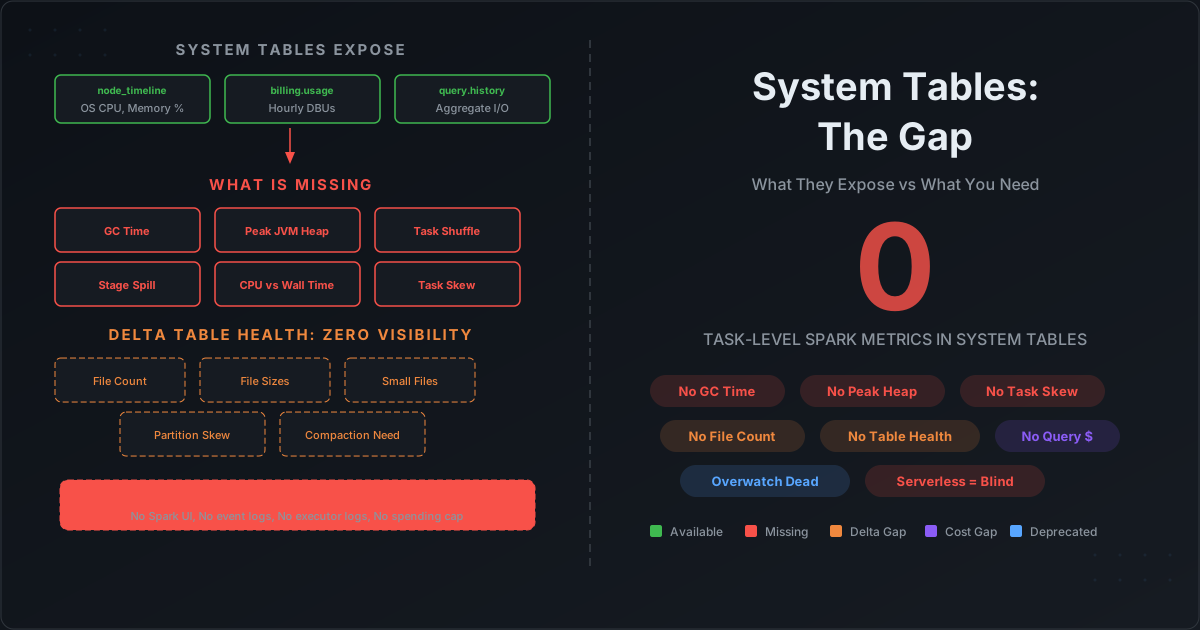
Databricks system tables look comprehensive on paper. Sixteen tables across ten schemas. Billing, compute, jobs, queries, lineage, audit. When Databricks deprecated Overwatch and pointed everyone to system tables, the message was clear: this is the future of observability.

But if you have ever tried to answer these questions using only system tables, you already know the gap:

  • Why is my job's GC time at 15%? (System tables do not track GC time.)
  • Which stage is spilling to disk? (System tables do not track per-stage spill.)
  • Which executor is the memory bottleneck? (System tables do not track executor-level JVM metrics.)
  • How many files does my Delta table have? Is it healthy? (System tables do not track Delta table physical metrics.)
  • What did my serverless job's infrastructure look like? (System tables do not populate node_timeline for serverless.)

This post documents exactly what Databricks system tables contain — column by column — and exactly what is missing. Every claim is verifiable against Databricks' own documentation.
How to Profile Spark Jobs After Completion: The Complete Guide to Collecting Metrics on Databricks, EMR, and Dataproc

· 22 min read
Cazpian Engineering
Platform Engineering Team

How to Profile Spark Jobs After Completion

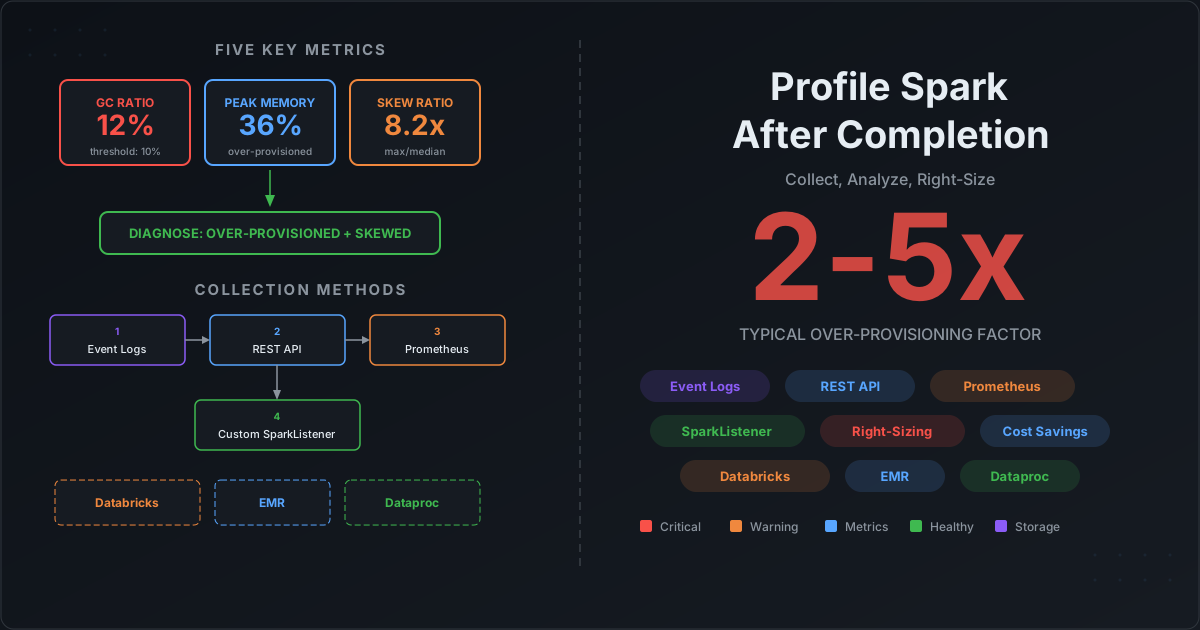
Your Spark job finished. It ran for 2 hours. It used 50 executors. The bill arrived. Now what?

Most teams have no systematic way to answer the obvious follow-up questions: Was 50 executors the right number? Did we waste memory? Was there data skew? Should we use different instance types? They either overprovision "just in case" — burning 2-5x the needed budget — or reactively debug when jobs fail with OOM errors.

The root cause is not a lack of tooling. It is a data collection problem. Spark generates extraordinarily detailed metrics at every level — task, stage, executor, application — but those metrics vanish when the application terminates. If you did not capture them during or immediately after execution, they are gone.

This post solves that problem. We cover every method for collecting Spark profiling metrics, show exactly how to set them up on Databricks, EMR, and Dataproc, and then show you how to turn those metrics into right-sizing decisions with concrete formulas and thresholds.

Spark Runtime Metrics Collection with DriverPlugin, ExecutorPlugin, and SparkListener

· 23 min read
Cazpian Engineering
Platform Engineering Team

Spark Runtime Metrics Collection with DriverPlugin, ExecutorPlugin, and SparkListener

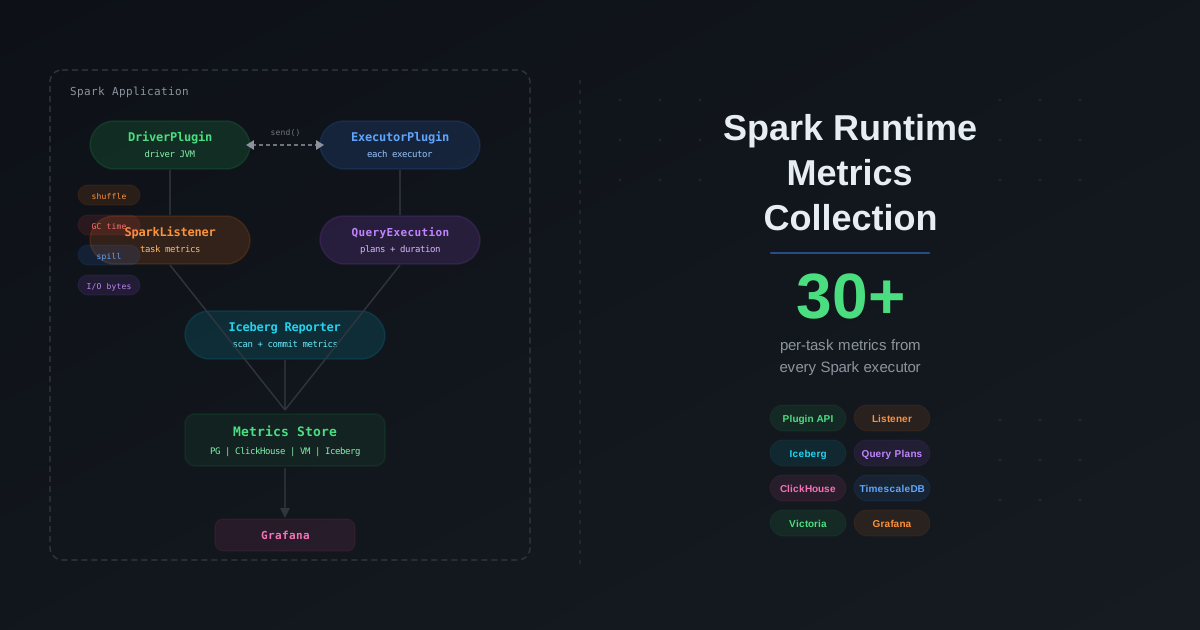
You tuned your Spark cluster. You picked the right join strategies. You enabled AQE. But you are still flying blind. When a job takes twice as long as yesterday, you open the Spark UI, scroll through 200 stages, and guess. When an Iceberg scan suddenly plans for 12 seconds instead of 2, you have no history to compare against. You cannot trend what you do not collect.

Apache Spark ships a powerful but underused plugin system — DriverPlugin, ExecutorPlugin, and SparkListener — that lets you tap into every metric the engine produces at runtime. Combined with Iceberg's MetricsReporter, you get a unified view of compute and storage performance for every query, every task, and every table scan. This post shows you how to build that pipeline from scratch, store the metrics at scale, and turn raw numbers into actionable performance insights.