Iceberg Scan and Commit Fine-Tuning: The Production Operations Guide for Spark

You have set up your Iceberg tables. You picked a partition spec. You enabled bloom filters. Maybe you even ran compaction once. But the questions keep coming: Should I sort the table AND add bloom filters, or is one enough? My queries are still opening thousands of files — what is Spark actually doing during scan planning? I have 50,000 snapshots — is that a problem? I switched to format version 2 but my reads got slower — why? What happens if I never compact my delete files?
These are the questions that every data engineering team hits after the first month in production. The individual features are documented, but the interactions between them — and the operational decisions that determine whether your tables stay fast or silently degrade — are not written down anywhere.
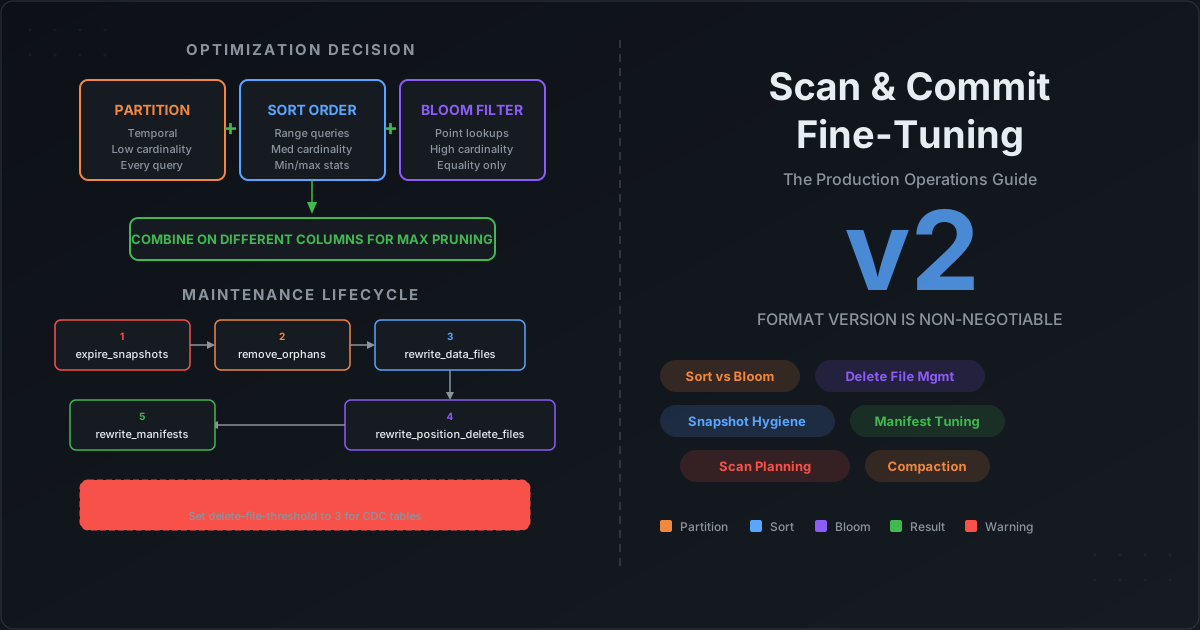
This post is the production operations guide. We cover the decision framework for partition vs sort vs bloom filter, explain exactly what happens during scan planning so you know where compute is wasted, walk through every maintenance procedure with recommended thresholds, explain why format version 2 is non-negotiable and what delete file neglect costs you, and give you the complete maintenance lifecycle in the right execution order.
The Decision: Partition vs Sort Order vs Bloom Filter
The most common question we hear is: "I have a column that queries filter on — should I partition by it, sort by it, or add a bloom filter?" The answer depends on three things: cardinality, predicate type, and how often the column appears in queries.
The Three Pruning Layers
Iceberg applies query filters at three progressively finer levels. Each layer eliminates data that the next layer does not need to evaluate:
Layer 1: Partition Pruning (manifest list → partition summaries)
  Eliminates entire partitions — directories of files never opened.
  Cost: near zero. Reads a single Avro manifest list file.

Layer 2: File Pruning (manifest entries → column min/max statistics)
  Eliminates individual data files within surviving partitions.
  Cost: reads manifest files (~8 MB each). Effective only if data is sorted.

Layer 3: Row Group Filtering (Parquet footer → bloom filters + column indexes)
  Eliminates row groups within surviving files.
  Cost: reads Parquet footer + bloom filter data (~1-2 MB per file). Only for equality predicates.
Each layer is independent — you can use any combination. But the biggest wins come from enabling all three on the right columns.
The Decision Matrix
| Column characteristic | Recommended optimization | Why |
|---|---|---|
| Temporal, in nearly every query | Partition (day, month, hour) | Coarsest elimination. Zero cost per query. |
| Low cardinality (under 1,000 distinct), always filtered | Partition (identity or bucket) | Every file contains most values — sort and bloom cannot help. |
| Medium cardinality, range queries common | Sort order | Sorting creates narrow min/max ranges per file. Bloom filters cannot help with ranges. |
| High cardinality (over 10K distinct), equality lookups | Bloom filter | Min/max spans entire value space. Only bloom can eliminate row groups. |
| Join key, used in both filters and joins | Bucket partition | Enables storage-partitioned joins (eliminates shuffle). |
| Column never appears in WHERE clauses | Nothing | Any optimization is overhead with no benefit. |
When to Combine Sort Order and Bloom Filter
This is the question that trips up most teams. The answer is simple:
Sort and bloom filter should target different columns.
If a table is sorted by event_type, min/max statistics are already highly effective for event_type — each file covers a narrow range. A bloom filter on event_type is redundant. But a bloom filter on user_id (unsorted, high-cardinality) fills the gap that min/max statistics cannot:
-- Partition by time (Layer 1)
-- Sort by event_type (Layer 2 — makes min/max stats effective)
-- Bloom filter on user_id (Layer 3 — point lookup on unsorted column)

CREATE TABLE analytics.events (
  event_id    STRING,
  user_id     STRING,
  event_type  STRING,
  event_time  TIMESTAMP,
  payload     STRING
)
USING iceberg
PARTITIONED BY (day(event_time))
TBLPROPERTIES (
  'write.parquet.bloom-filter-enabled.column.user_id' = 'true',
  'write.parquet.bloom-filter-enabled.column.session_id' = 'true'
);

ALTER TABLE analytics.events WRITE ORDERED BY event_type;
With this configuration, a query like WHERE event_time = '2026-03-15' AND event_type = 'purchase' AND user_id = 'abc-123' hits all three layers:
- Partition pruning eliminates all days except March 15.
- Sort-based min/max statistics eliminate files that do not contain
event_type = 'purchase'. - Bloom filter eliminates row groups that definitely do not contain
user_id = 'abc-123'.
The compound effect: instead of reading 500 files, Spark reads 1.
Can You Sort and Bloom Filter the Same Column?
Technically yes — Iceberg does not prevent it. But it is a waste. The bloom filter adds ~1 MB per column per row group to every Parquet file, but min/max statistics on the sorted column already provide file-level pruning. The bloom filter's only marginal benefit is row-group-level pruning within the 1-2 files that survive file-level pruning — rarely worth the storage overhead.
Exception: Z-order. When you Z-order by multiple columns, no single column gets perfectly tight min/max ranges (Z-ordering interleaves bits across dimensions). A bloom filter on a Z-ordered column can provide additional pruning that the broader min/max ranges miss. If you use Z-order and one of the Z-ordered columns is also used for point lookups, a bloom filter on that column is justified.
Bucket Partition vs Bloom Filter
Both help with equality predicates on the same column, but they serve different purposes:
| Bucket partition | Bloom filter | |
|---|---|---|
| Cardinality sweet spot | Medium (100s-10Ks) | High (10Ks-millions) |
| Benefit | Eliminates entire file groups + enables storage-partitioned joins | Eliminates row groups within files |
| Cost | Creates physical directory structure, multiplies partitions | ~1 MB per column per row group |
| Join optimization | Yes — eliminates shuffle for joins on the bucket column | No |
| When to prefer | Column is a join key AND a filter column | Column is only used for point lookups |
If user_id is used in both WHERE user_id = ... and JOIN ... ON a.user_id = b.user_id, bucket partitioning is the stronger choice. If transaction_id is only used in WHERE transaction_id = ... and never in joins, a bloom filter avoids the partition overhead.
The Decision Tree
Is this column in nearly every query's WHERE clause?
├── YES: Is it temporal?
│   ├── YES → Partition by day/month/hour
│   └── NO:  Is cardinality < 1,000?
│       ├── YES → Partition by identity or bucket
│       └── NO  → Sort order (primary key) + consider bloom on other columns
└── NO:  Is it used in range queries (>, <, BETWEEN)?
    ├── YES → Sort order (secondary key)
    └── NO:  Is it used in equality lookups (=, IN)?
        ├── YES: Is cardinality > 10,000?
        │   ├── YES → Bloom filter
        │   └── NO  → Bucket partition (if also join key) or nothing
        └── NO  → No optimization needed
Does GROUP BY Benefit from Sort Order or Bloom Filters?
This is one of the most common misconceptions. The short answer: GROUP BY does not trigger sort order pruning or bloom filter pruning.
Both sort order (min/max statistics) and bloom filters work by eliminating data that cannot match a WHERE predicate. They answer "does this file contain value X?" and skip it if the answer is no. But GROUP BY needs to read every value to compute the aggregation — there is nothing to skip.
-- Bloom filter and sort order DO help: WHERE filters data
SELECT COUNT(*) FROM events WHERE user_id = 'abc-123';

-- Bloom filter and sort order do NOT help: GROUP BY reads everything
SELECT event_type, COUNT(*) FROM events GROUP BY event_type;

-- Partial benefit: WHERE triggers pruning, GROUP BY runs on surviving data
SELECT event_type, COUNT(*)
FROM events
WHERE event_time >= '2026-03-01' AND event_time < '2026-03-02'
GROUP BY event_type;
In the third query, partition pruning on event_time and sort/bloom on any WHERE column still apply. But the GROUP BY itself adds no additional file skipping.
What actually helps GROUP BY performance:
| Optimization | How it helps GROUP BY |
|---|---|
| Partition pruning (via WHERE) | Reduces the data GROUP BY must process. A GROUP BY over one day of data is 365x cheaper than over a full year. |
| Column pruning | Spark reads only the columns in SELECT and GROUP BY, not the entire row. Wide tables benefit enormously — a 200-column table where GROUP BY touches 2 columns reads ~1% of the data. |
| Sort order on the GROUP BY column | Does NOT skip files. But sorted data enables streaming aggregation — Spark can aggregate in a single pass without building a full hash table, reducing memory pressure. This is an execution-level optimization, not a scan-level one. |
| AQE coalescing | Adaptive Query Execution merges small post-shuffle partitions, reducing task overhead for skewed GROUP BY keys. |
The key insight: pruning optimizations (partition, sort/min-max, bloom) only help the WHERE clause. GROUP BY benefits from data layout (sorting, partitioning) through execution efficiency, not through scan skipping.
If your workload is GROUP BY heavy with no selective WHERE clause (e.g., full-table aggregations), the most impactful optimizations are column pruning, compression (zstd), and ensuring files are well-sized (256 MB). Sort order and bloom filters will not help.
What Happens During Scan Planning
Understanding what Spark actually does when you run SELECT * FROM events WHERE ... reveals where compute is wasted and what you can control.
The Full Path: Metadata to Data
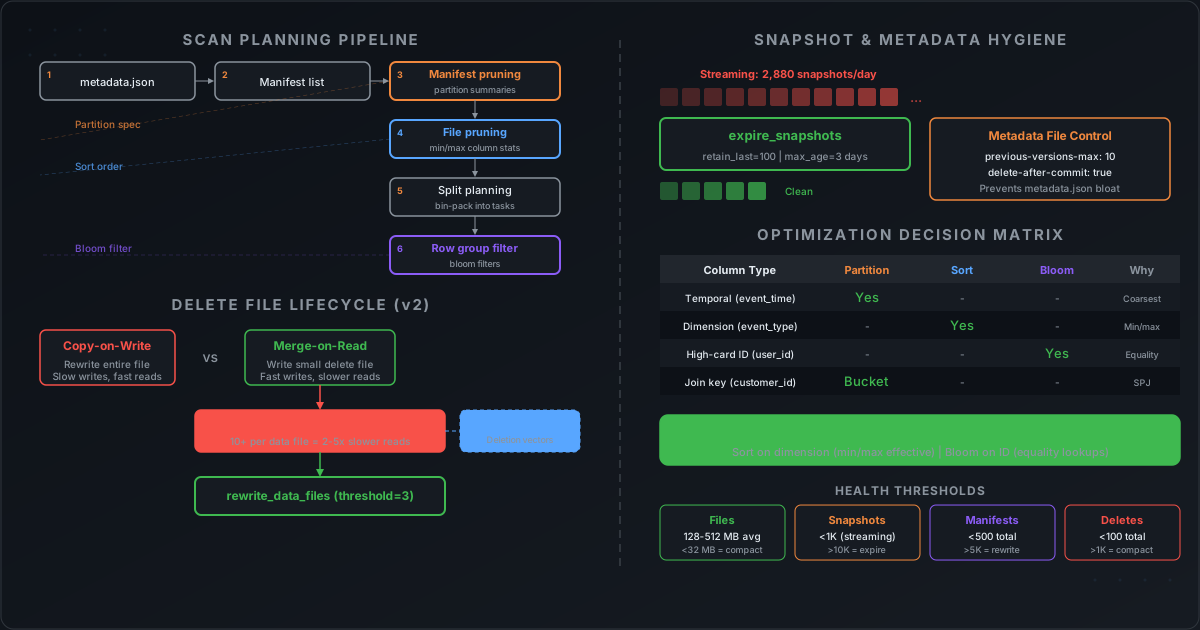
When Spark executes a query against an Iceberg table, the scan planning pipeline runs through six stages before a single data byte is read:
Stage 1: Read table metadata. Spark reads the current metadata.json file from the catalog. This file is typically a few KB to a few MB and contains the current snapshot ID, schema, partition spec, sort order, and table properties.
Stage 2: Read manifest list. The current snapshot points to a manifest list — a single Avro file that lists all manifest files for this snapshot. Each entry includes partition summaries (min/max partition values) for that manifest. This enables the first level of pruning.
Stage 3: Manifest-level pruning. The query's partition predicates are evaluated against each manifest's partition summaries. A manifest whose partition range does not overlap the query predicate is skipped entirely — Spark never reads it.
For example, if querying WHERE event_date = '2026-03-15' and a manifest's partition summary shows lower_bound='2026-01-01', upper_bound='2026-01-31', that manifest (and all its data file entries) is skipped.
Stage 4: File-level pruning. For surviving manifests, Spark reads the individual data file entries. Each entry includes per-column min/max statistics. Files whose column ranges do not overlap the query predicate are eliminated.
This is where sort order pays off. If data is sorted by event_type, each file covers a narrow range (e.g., one file has min='click', max='click', another has min='purchase', max='purchase'). A filter on event_type = 'purchase' skips all files except the ones in that range. Without sorting, every file has min='click', max='view' — nothing can be skipped.
Stage 5: Split planning. Surviving files are divided into splits — the unit of Spark parallelism. Iceberg's bin-packing algorithm combines small files into a single split and splits large files across multiple splits, using two key properties:
| Property | Default | What it does |
|---|---|---|
read.split.target-size | 128 MB | Target bytes per split. Controls Spark task count. |
read.split.open-file-cost | 4 MB | Minimum weight per file during bin packing. Prevents grouping too many small files into one task. |
The open-file-cost deserves attention. Every file Spark opens incurs a fixed overhead: an S3 GetObject request (~5-20ms), a Parquet footer read, and reader initialization. If you have 1,000 files of 100 KB each (100 MB total), without open-file-cost the bin packer might create a single 128 MB split containing all 1,000 files — and that task spends minutes just opening files. With 4 MB open cost, each file weighs at least 4 MB in the packing algorithm, spreading them across ~31 splits.
Stage 6: Row group filtering. When Spark reads a surviving file, it checks the Parquet footer for bloom filters and column indexes. Row groups where the bloom filter says "not present" are skipped without reading column data.
Where Compute Is Wasted
Now you can see the failure modes:
| Symptom | Root cause | Fix |
|---|---|---|
| Stage 3 skips nothing | Manifests have overlapping partition ranges (from streaming commits) | Run rewrite_manifests |
| Stage 4 skips nothing | Data is not sorted — every file's min/max spans full domain | Add sort order + run compaction with sort strategy |
| Stage 5 creates straggler tasks | Many small files packed into one split | Run rewrite_data_files with binpack strategy |
| Stage 6 skips nothing | No bloom filters on high-cardinality lookup columns | Enable bloom filters per column |
| Scan planning itself is slow | Too many manifests or too many snapshots | Expire snapshots + rewrite manifests |
Why Format Version 2 Is Non-Negotiable
If your tables are still on format version 1, upgrade them. There is no reason to stay on v1 for any new table, and the cost of remaining on v1 grows with every DELETE, UPDATE, or MERGE you run.
What v1 Cannot Do
Format version 1 only supports copy-on-write (CoW) for row-level operations. When you delete or update a single row, Iceberg rewrites the entire data file that contains it. The implications:
Scenario: UPDATE 1 row in a table with 1,000 files of 256 MB each

Format v1 (CoW only):
  → Spark scans all 1,000 files to find the matching row
  → The file containing the row (256 MB) is rewritten in full
  → 256 MB written to create a new file that differs by one row

Format v2 (Merge-on-Read available):
  → Spark scans and locates the matching row at (file_path, row_position)
  → A position delete file is written: ~few KB
  → Original data file is untouched
For a MERGE INTO that touches rows across 100 files, v1 rewrites 25 GB of data. v2 writes a few KB of delete files. The write throughput difference is 2x-10x for sparse updates, confirmed by AWS benchmarks on a 47.4 GB dataset.
What v2 Enables
| Capability | v1 | v2 |
|---|---|---|
| Copy-on-write (CoW) | Yes | Yes |
| Merge-on-read (MoR) | No | Yes |
| Position delete files | No | Yes |
| Equality delete files | No | Yes |
| Row-level DELETE without full file rewrite | No | Yes |
| Row-level UPDATE without full file rewrite | No | Yes |
| Efficient MERGE INTO for CDC | No | Yes |
| Sequence numbers for conflict resolution | No | Yes |
How Position Delete Files Work
When Spark executes a DELETE or UPDATE on a v2 table with merge-on-read mode, it writes a position delete file — a small Parquet file containing two columns:
| Column | Type | Content |
|---|---|---|
file_path | string | Path to the data file containing the deleted row |
pos | long | Zero-based row position within that file |
At read time, Spark loads the position delete file, builds an in-memory bitmap of deleted positions, and filters them out while scanning the data file. The data file itself is never modified.
Even 10 million position delete records only consume ~14 MB of storage due to Parquet's compression and dictionary encoding on the file_path column.
How to Upgrade
-- Upgrade an existing table to format version 2
ALTER TABLE analytics.events SET TBLPROPERTIES (
  'format-version' = '2'
);

-- Enable merge-on-read for write operations
ALTER TABLE analytics.events SET TBLPROPERTIES (
  'write.delete.mode' = 'merge-on-read',
  'write.update.mode' = 'merge-on-read',
  'write.merge.mode'  = 'merge-on-read'
);
The upgrade is non-destructive — existing data files are not modified. The format version change only affects how new commits are written. All existing readers that support v2 (Spark 3.x, Trino, Presto, Dremio, Athena) will work immediately.
The Trade-Off You Must Manage
Merge-on-read shifts cost from the write path to the read path. Writes become fast, but delete files accumulate. Every query must now merge data files with their associated delete files at read time. This is the single most important maintenance obligation for v2 tables — and the one that teams most often neglect.
Delete File Accumulation: The Silent Performance Killer
This is the failure mode we see most often in production Iceberg deployments. A team enables merge-on-read, writes are fast, and everything looks great — for the first week. Then queries start getting slower. Within a month, dashboards that loaded in 3 seconds take 30. The root cause: delete files that were never compacted.
What Happens During Reads
For every data file in a query's scan, Spark must:
- Open and read the data file.
- Find all position delete files that reference this data file.
- Open and read each position delete file.
- Build an in-memory bitmap of deleted row positions.
- Scan the data file, filtering out deleted rows.
With one or two delete files per data file, this overhead is negligible. At 10 delete files per data file, it is noticeable. At 100, queries become unusable.
The Degradation Curve
| Delete files per data file | Impact |
|---|---|
| 1-5 | Mild. Each read opens 1-5 extra small files. Barely noticeable. |
| 5-10 | Noticeable. Queries slow by 20-50%. Starburst benchmarks showed 1.5x degradation with just 3% of data modified. |
| 10-50 | Significant. Each data file scan opens 10-50 extra files, builds large bitmaps. Latency increases 2-5x. |
| 50-100+ | Severe. Tables become unusable for interactive queries. Scan planning alone can take minutes due to manifest size. Emergency compaction required. |
Beyond query latency, delete file accumulation causes:
- Memory pressure. Delete bitmaps must be held in executor memory during scan. At scale, this causes OOM errors.
- Manifest bloat. Each delete file adds an entry to a manifest. Thousands of delete files inflate manifest files, slowing scan planning.
- Storage waste. The "deleted" rows still occupy space in the original data files until compaction physically removes them.
How to Compact Delete Files
The rewrite_data_files procedure applies pending delete files by rewriting data files with deleted rows physically removed:
-- Compact data files that have 3 or more associated delete files
CALL spark_catalog.system.rewrite_data_files(
  table => 'analytics.events',
  options => map(
    'delete-file-threshold', '3',
    'target-file-size-bytes', '268435456'
  )
);
The delete-file-threshold option is critical. It specifies the minimum number of delete files associated with a data file to trigger rewriting, regardless of the data file's size. The default is Integer.MAX_VALUE (effectively disabled) — meaning Iceberg will never compact based on delete files unless you explicitly set this.
Recommended values:
| Workload | delete-file-threshold | Reasoning |
|---|---|---|
| CDC / streaming upserts | 1-3 | High mutation rate. Compact aggressively to keep reads fast. |
| Mixed read/write | 3-5 | Balance compaction cost with read performance. |
| Infrequent updates | 10-50 | Lower priority — fewer delete files accumulate. |
The Dedicated Position Delete File Procedure
In addition to rewrite_data_files, Iceberg provides rewrite_position_delete_files specifically for compacting position delete files without rewriting data:
-- Compact many small position delete files into fewer, larger ones
CALL spark_catalog.system.rewrite_position_delete_files(
  table => 'analytics.events',
  options => map('min-input-files', '2')
);
This procedure also cleans up dangling deletes — position delete records that reference data files no longer in the current snapshot (a common artifact after rewrite_data_files). Running it after data file compaction prevents these orphaned records from inflating manifests.
What Happens If You Never Compact
Consider a CDC table receiving 10 update batches per day with no compaction:
- Day 1: 10 delete files per data file. Queries 1.5x slower.
- Day 10: 100 delete files per data file. Queries 5-10x slower. Scan planning itself takes minutes.
- Day 30: 300 delete files per data file. Table is unusable for interactive queries. Executors OOM on delete bitmaps. Emergency compaction required — and it will take hours because the maintenance debt is massive.
This is not theoretical. The Trino community reported tables with millions of deleted rows (via delete files) taking hours to query. The fix is always the same: compact regularly before the debt accumulates.
Small File Compaction and Manifest Compaction
Delete files are not the only maintenance concern. Small data files and fragmented manifests both degrade query performance through different mechanisms.
Small File Compaction
Small files waste compute through file-open overhead. Every file Spark reads requires an S3 GetObject request (~5-20ms), a Parquet footer read, and reader initialization. A table with 50,000 files of 2 MB each spends 4+ minutes just opening files before processing a single row.
-- Bin-pack: merge small files without re-sorting (cheapest)
CALL spark_catalog.system.rewrite_data_files(
  table => 'analytics.events',
  strategy => 'binpack',
  options => map(
    'target-file-size-bytes', '268435456',
    'min-file-size-bytes', '104857600',
    'min-input-files', '5'
  )
);

-- Sort: rewrite files in sorted order (better min/max stats, more expensive)
CALL spark_catalog.system.rewrite_data_files(
  table => 'analytics.events',
  strategy => 'sort',
  sort_order => 'event_type ASC NULLS LAST'
);

-- Z-order: multi-dimensional clustering (best for diverse query patterns)
CALL spark_catalog.system.rewrite_data_files(
  table => 'analytics.events',
  strategy => 'sort',
  sort_order => 'zorder(event_type, user_region)'
);
Which strategy to choose:
| Strategy | Cost | Benefit | When to use |
|---|---|---|---|
binpack | Low (no shuffle) | Fixes small files. No data reordering. | After streaming ingestion. Regular maintenance. |
sort | Medium (shuffle + sort) | Fixes small files AND creates optimal min/max ranges. | When queries consistently filter on 1-2 columns. |
zorder | High (shuffle + Z-order computation) | Multi-dimensional clustering for diverse filter patterns. | When queries filter on different columns interchangeably. |
For large tables, use partial progress to avoid losing all work if a single file group fails:
CALL spark_catalog.system.rewrite_data_files(
  table => 'analytics.events',
  strategy => 'binpack',
  options => map(
    'partial-progress.enabled', 'true',
    'partial-progress.max-commits', '10',
    'max-concurrent-file-group-rewrites', '5'
  )
);
Target specific partitions to avoid compacting data that is actively being written:
-- Compact only cold partitions (older than 7 days)
CALL spark_catalog.system.rewrite_data_files(
  table => 'analytics.events',
  where => 'event_time < TIMESTAMP ''2026-03-11 00:00:00'''
);
Manifest Compaction
Small files are visible. Manifest fragmentation is invisible — and equally damaging.
When data is ingested via streaming or frequent small commits, each commit creates a new manifest file. If each commit writes files across many partitions, every manifest ends up with overlapping partition ranges. This defeats manifest-level pruning (Stage 3 of scan planning) because no manifest can be skipped.
Before manifest compaction: 379 manifests, each containing files from all daily partitions. A query for a single day must read all 379 manifests. (Adobe benchmark)
After manifest compaction: Manifests are rewritten with entries sorted by partition. Each manifest covers 1-2 days. A single-day query touches 1 manifest. Planning time drops dramatically.
-- Rewrite manifests to align entries with partition boundaries
CALL spark_catalog.system.rewrite_manifests(
  table => 'analytics.events'
);
rewrite_manifests does not rewrite data files. It only reorganizes manifest metadata — sorting entries by partition fields so that partition summaries have tight, non-overlapping bounds. This makes manifest-level pruning effective.
When to run it:
- After many small streaming commits (manifests accumulated with overlapping partition ranges).
- After
rewrite_data_files(compaction can fragment manifests). - When scan planning time is increasing without corresponding data growth.
Important: Always run expire_snapshots before rewrite_manifests. A manifest rewrite cannot consolidate manifests that are still referenced by retained snapshots. Expiring snapshots first reduces the metadata surface area.
Snapshot Hygiene and Metadata Control
Every commit to an Iceberg table — INSERT, UPDATE, DELETE, MERGE, compaction, even schema changes — creates a new snapshot. Snapshots are immutable, point-in-time views of the table. They enable time travel, rollback, concurrent readers, and incremental processing. But they accumulate without bound unless you actively manage them.
Why Snapshots Accumulate
A streaming pipeline committing every 30 seconds generates 2,880 snapshots per day. A daily batch job generates 1 per day. Compaction runs add more. Within a month, a moderately active table can have 50,000+ snapshots.
Each snapshot references a manifest list, which references manifest files, which reference data files. As snapshots accumulate:
- Metadata file count grows. Each commit creates a new
metadata.jsonfile. - Manifest list grows. More manifests to enumerate during scan planning.
- Scan planning slows. The coordinator must load and evaluate more metadata.
- Memory pressure increases. At scale, loading column statistics for millions of files can cause OOM on the driver.
Expire Snapshots
The expire_snapshots procedure removes old snapshots and — crucially — deletes data files, delete files, and manifests that are only referenced by the expired snapshots.
CALL spark_catalog.system.expire_snapshots(
  table => 'analytics.events',
  older_than => TIMESTAMP '2026-03-15 00:00:00',
  retain_last => 10,
  max_concurrent_deletes => 10,
  stream_results => true
);
| Parameter | Purpose |
|---|---|
older_than | Delete snapshots older than this timestamp. |
retain_last | Keep at least this many snapshots regardless of age. |
max_concurrent_deletes | Parallelize file deletions for speed. |
stream_results | Reduce driver memory when expiring thousands of files. |
How Many Snapshots to Keep
There is no single right number. It depends on your workload's need for time travel, rollback, and concurrent reader protection:
| Workload | retain_last | max-snapshot-age-ms | Expiration frequency |
|---|---|---|---|
| Streaming / micro-batch | 100-300 | 1-3 days | Every 1-3 hours |
| Hourly batch | 50-100 | 3-7 days | Daily |
| Daily batch | 10-50 | 7-30 days | Daily |
| Weekly / monthly loads | 5-10 | 30-90 days | Weekly |
Key table properties:
ALTER TABLE analytics.events SET TBLPROPERTIES (
  -- Snapshots older than 3 days are eligible for expiration
  'history.expire.max-snapshot-age-ms' = '259200000',
  -- Always keep at least 100 snapshots (protects concurrent readers)
  'history.expire.min-snapshots-to-keep' = '100'
);
min-snapshots-to-keep takes precedence over age-based expiration. Even if a snapshot is older than max-snapshot-age-ms, it is retained if it is within the minimum count.
What Happens If You Set Retention Too Low
- Time travel breaks. Expired snapshots are permanently gone. Queries referencing them fail.
- Concurrent readers fail. A reader that loaded metadata before expiration may get
FileNotFoundExceptionif the underlying data files were deleted while the query was in-flight. - Incremental consumers lose position. CDC consumers tracking changes between snapshots lose their reference point.
Safe minimum for streaming tables: Retain at least 100 snapshots AND at least 24 hours. This gives concurrent readers time to finish and allows rollback for operational issues.
Metadata File Control
Beyond snapshots, the metadata.json files themselves accumulate. Every commit creates a new one. A streaming table committing every 30 seconds generates 2,880 metadata files per day.
ALTER TABLE analytics.events SET TBLPROPERTIES (
  -- Keep only the last 10 metadata.json files (default: 100)
  'write.metadata.previous-versions-max' = '10',
  -- Automatically delete old metadata files after each commit
  'write.metadata.delete-after-commit.enabled' = 'true'
);
| Property | Default | Recommended |
|---|---|---|
write.metadata.previous-versions-max | 100 | 10-20 for streaming, 50-100 for batch |
write.metadata.delete-after-commit.enabled | false | true for any table with frequent commits |
delete-after-commit defaults to false for safety — it prevents accidentally deleting metadata that a concurrent reader needs. For production streaming tables, enable it and set previous-versions-max low to prevent metadata directory bloat.
Orphan File Cleanup
Orphan files are data files that exist on storage but are not referenced by any snapshot. They are created by failed writes, speculative Spark tasks, and incomplete compaction operations. They waste storage and can be safely removed — with care.
-- Always dry-run first to preview what would be deleted
CALL spark_catalog.system.remove_orphan_files(
  table => 'analytics.events',
  older_than => TIMESTAMP '2026-03-16 00:00:00',
  dry_run => true
);

-- Then run for real
CALL spark_catalog.system.remove_orphan_files(
  table => 'analytics.events',
  older_than => TIMESTAMP '2026-03-16 00:00:00'
);
Critical safety rules:
- Iceberg enforces a minimum 24-hour buffer on the
older_thanparameter. You cannot delete files newer than 24 hours. - Always run
expire_snapshotsbefore orphan cleanup. Otherwise, files still referenced by about-to-be-expired snapshots may be incorrectly identified as orphans. - Always dry-run first in production.
The Complete Maintenance Lifecycle
Order matters. Running these procedures in the wrong sequence can cause data loss or ineffective cleanup.
The Correct Execution Order
1. expire_snapshots        — Remove old snapshot metadata + unreferenced files
2. remove_orphan_files     — Clean up files not referenced by any snapshot
3. rewrite_data_files      — Compact small files + apply pending delete files
4. rewrite_position_delete_files — Clean up dangling delete records
5. rewrite_manifests       — Consolidate fragmented manifests
Why this order:
- Expire first so that
remove_orphan_filesdoes not accidentally delete files still tracked by soon-to-be-expired snapshots. - Compact after expiration because compaction creates new snapshots. Expiring first keeps the snapshot count manageable.
- Rewrite delete files after compaction to clean up dangling records that
rewrite_data_filesleft behind. - Rewrite manifests last because expiration and compaction both fragment manifests. Rewriting them last produces the cleanest result.
Production Maintenance Template
Here is a complete maintenance job suitable for scheduling in Airflow, Dagster, or any orchestrator:
-- ============================================================
-- Iceberg Table Maintenance Job
-- Schedule: Daily for streaming tables, weekly for batch tables
-- ============================================================

-- Step 1: Expire old snapshots (keep last 3 days, at least 100 snapshots)
CALL spark_catalog.system.expire_snapshots(
  table => 'analytics.events',
  older_than => TIMESTAMP '2026-03-15 00:00:00',
  retain_last => 100,
  max_concurrent_deletes => 10,
  stream_results => true
);

-- Step 2: Remove orphan files (safety buffer: 3 days)
CALL spark_catalog.system.remove_orphan_files(
  table => 'analytics.events',
  older_than => TIMESTAMP '2026-03-15 00:00:00'
);

-- Step 3: Compact data files + apply delete files (cold partitions only)
CALL spark_catalog.system.rewrite_data_files(
  table => 'analytics.events',
  strategy => 'binpack',
  where => 'event_time < TIMESTAMP ''2026-03-17 00:00:00''',
  options => map(
    'target-file-size-bytes', '268435456',
    'delete-file-threshold', '3',
    'min-input-files', '5',
    'partial-progress.enabled', 'true',
    'partial-progress.max-commits', '10'
  )
);

-- Step 4: Clean up dangling position delete files
CALL spark_catalog.system.rewrite_position_delete_files(
  table => 'analytics.events',
  options => map('min-input-files', '2')
);

-- Step 5: Consolidate fragmented manifests
CALL spark_catalog.system.rewrite_manifests(
  table => 'analytics.events'
);
Maintenance Cadence by Workload
| Workload | Compaction | Snapshot expiration | Orphan cleanup | Manifest rewrite |
|---|---|---|---|---|
| Streaming / CDC | Every 1-4 hours | Every 1-3 hours | Daily | Weekly |
| Daily batch | After each batch | Daily | Weekly | Monthly |
| Low-volume / static | Weekly | Weekly | Monthly | Quarterly |
Looking Ahead: Format Version 3 and Deletion Vectors
Iceberg format version 3, reaching general availability in Iceberg 1.10.0, introduces deletion vectors — a fundamentally better approach to the delete file problem.
What Changes
Deletion vectors replace position delete files with Roaring bitmaps stored in compact Puffin files. The critical improvement: there can be at most one deletion vector per data file per snapshot. Writers must merge new deletes with existing vectors. This means deletion vectors cannot accumulate the way position delete files do.
| Position delete files (v2) | Deletion vectors (v3) | |
|---|---|---|
| Format | Parquet | Puffin (Roaring bitmaps) |
| Accumulation | Multiple per data file. Grow over time. | One per data file. Merged on write. |
| Storage | ~14 MB for 10M deletes | ~475 bytes for same workload (73.6% smaller) |
| Read overhead | Opens N delete files per data file | Single bitmap lookup |
| Compaction pressure | High — must compact regularly | Low — no accumulation |
AWS benchmarks on EMR showed deletion vectors are 55% faster for delete operations, produce 73.6% smaller delete metadata, and improve read performance by 23-28% compared to v2 position deletes.
When to Adopt v3
Format v3 is supported in Iceberg 1.8.0+ for writing deletion vectors. Full ecosystem support (Spark, Trino, Flink, Athena) is maturing through 2026. If your engine supports v3, adopting it eliminates the most painful maintenance obligation — delete file compaction. For tables with heavy UPDATE/DELETE/MERGE workloads, v3 is the most impactful upgrade available.
Quick Reference: Configuration Cheat Sheet
Table Properties for Scan Performance
| Goal | Property | Recommended value |
|---|---|---|
| Partition pruning | PARTITIONED BY (day(col)) | Time-based transform matching query patterns |
| Sort for file pruning | ALTER TABLE ... WRITE ORDERED BY col | Primary filter column (not the partition column) |
| Bloom filter for point lookups | write.parquet.bloom-filter-enabled.column.<col> | true for high-cardinality, unsorted columns |
| Column statistics on filter columns | write.metadata.metrics.column.<col> | full for numerics, truncate(16) for strings |
| Disable stats on blob columns | write.metadata.metrics.column.<col> | none for payload, JSON, map columns |
| Split size for parallelism | read.split.target-size | 64 MB (low-latency) to 256 MB (batch) |
Table Properties for Write and Maintenance
| Goal | Property | Recommended value |
|---|---|---|
| Format version | format-version | 2 (minimum), 3 if engine supports |
| Merge-on-read for CDC/updates | write.delete.mode, write.update.mode, write.merge.mode | merge-on-read |
| Prevent small files | write.distribution-mode | hash (partitioned), range (sorted) |
| Target file size | write.target-file-size-bytes | 268435456 (256 MB) |
| Metadata file cleanup | write.metadata.previous-versions-max | 10-20 |
| Auto-delete old metadata | write.metadata.delete-after-commit.enabled | true |
| Snapshot retention age | history.expire.max-snapshot-age-ms | 1-7 days depending on workload |
| Minimum snapshots to keep | history.expire.min-snapshots-to-keep | 10-300 depending on workload |
| Manifest merging | commit.manifest-merge.enabled | true (default) |
| Commit retries (concurrent writers) | commit.retry.num-retries | 10 |
Delete File Compaction Options
| Option | Default | Recommended | Description |
|---|---|---|---|
delete-file-threshold | MAX_INT (disabled) | 3 for CDC, 5 for mixed | Min delete files per data file to trigger compaction |
min-input-files | 5 | 5 | Min files in a group to justify rewriting |
partial-progress.enabled | false | true (large tables) | Commit groups independently to avoid losing progress |
max-concurrent-file-group-rewrites | 5 | 5-10 | Parallelism for compaction |
Diagnosing Table Health
Use Iceberg metadata tables to identify problems before they affect queries:
-- Check file size distribution (detect small file problem)
SELECT
  COUNT(*) AS file_count,
  ROUND(AVG(file_size_in_bytes) / 1048576, 1) AS avg_file_mb,
  ROUND(MIN(file_size_in_bytes) / 1048576, 1) AS min_file_mb,
  SUM(record_count) AS total_records
FROM analytics.events.files;

-- Check snapshot accumulation
SELECT
  COUNT(*) AS snapshot_count,
  MIN(committed_at) AS oldest_snapshot,
  MAX(committed_at) AS newest_snapshot
FROM analytics.events.snapshots;

-- Check manifest fragmentation
SELECT
  COUNT(*) AS manifest_count,
  AVG(added_data_files_count + existing_data_files_count) AS avg_files_per_manifest
FROM analytics.events.manifests;

-- Detect delete file accumulation (v2 tables)
SELECT
  COUNT(*) AS delete_file_count,
  SUM(record_count) AS total_delete_records
FROM analytics.events.delete_files;
Health thresholds:
| Indicator | Healthy | Warning | Action required |
|---|---|---|---|
| Average file size | 128-512 MB | 32-128 MB | < 32 MB → compact |
| Snapshot count (streaming) | < 1,000 | 1,000-10,000 | > 10,000 → expire more frequently |
| Manifest count | < 500 | 500-5,000 | > 5,000 → rewrite manifests |
| Delete files (total) | < 100 | 100-1,000 | > 1,000 → compact with delete-file-threshold |
How Cazpian Handles This
On Cazpian, table maintenance is automated through the managed catalog. When you enable merge-on-read on a table, Cazpian automatically schedules delete file compaction based on the delete-file-threshold you configure (default: 3). Snapshot expiration, orphan file cleanup, and manifest compaction run on adaptive schedules — more frequently for high-churn tables, less for stable ones. The query history dashboard surfaces scan planning metrics (manifests scanned vs skipped, files pruned, row groups filtered by bloom) so you can see exactly where optimization is working and where it is not.
What's Next
This post covered the production operations layer — the decisions and maintenance that keep Iceberg tables fast after deployment. For the individual deep dives referenced throughout, see:
- Iceberg Table Design — table properties, partition spec design, and commit conflict resolution.
- Iceberg Query Performance Tuning — the three pruning layers, column statistics, and Spark read/write configs.
- Iceberg Bloom Filters — bloom filter internals, configuration, validation, and false positive behavior.
- Mastering Iceberg File Sizes — small file prevention, write distribution modes, and compaction strategies.
- Iceberg Metrics Reporting — ScanReport, CommitReport, and metadata table diagnostics.
- Storage Partitioned Joins — eliminating shuffle with bucket partitioning.
- Iceberg on AWS: S3FileIO — S3FileIO, ObjectStoreLocationProvider, and avoiding S3 throttling.