35 posts tagged with "Spark"

View All Tags

The Serverless Black Box: What You Lose on Databricks Serverless Compute

· 13 min read

Cazpian Engineering
Platform Engineering Team

The Serverless Black Box: What You Lose on Databricks Serverless Compute

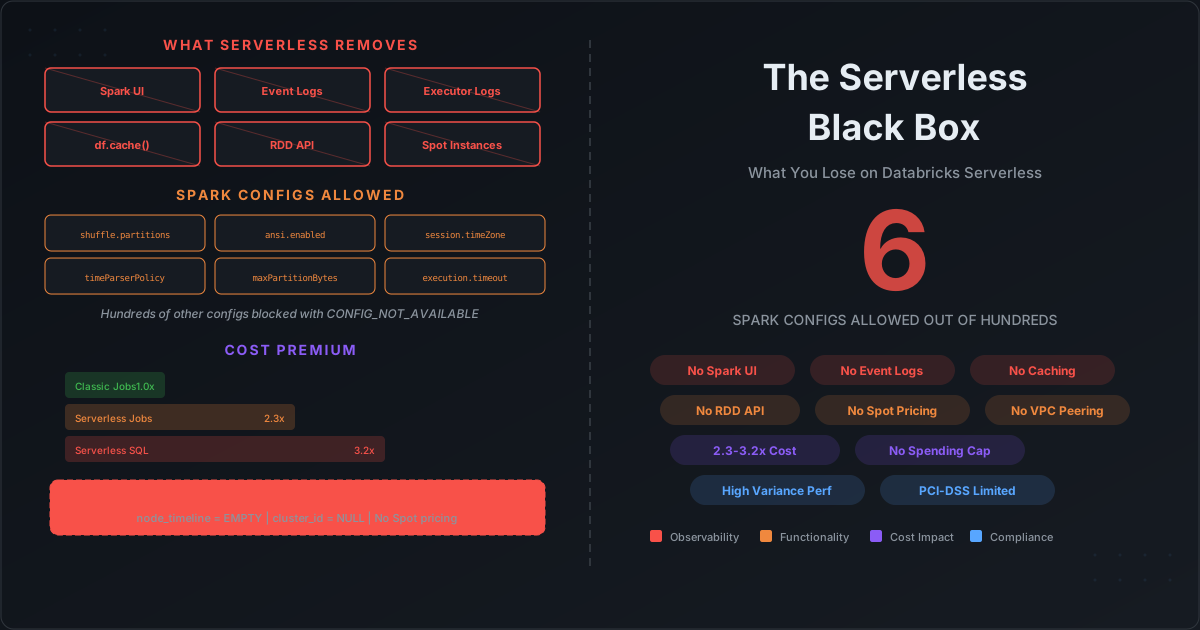
Databricks serverless compute promises a simple deal: stop managing clusters and just run your workloads. No instance selection. No autoscaling policies. No driver sizing. Just submit your query or job and let Databricks handle the rest.

The pitch is compelling. The reality is a black box that removes not just infrastructure management, but your ability to observe what is happening, tune how it runs, and control what it costs.

This is Part 3 of our Databricks observability series. In the previous post, we documented how system tables leave critical metrics gaps. Serverless makes those gaps dramatically worse — because on serverless, you lose even the tools that classic compute provides.
Databricks System Tables: The Observability Gap — What They Expose vs What You Actually Need for Cost Control

· 17 min read
Cazpian Engineering
Platform Engineering Team

Databricks System Tables: The Observability Gap

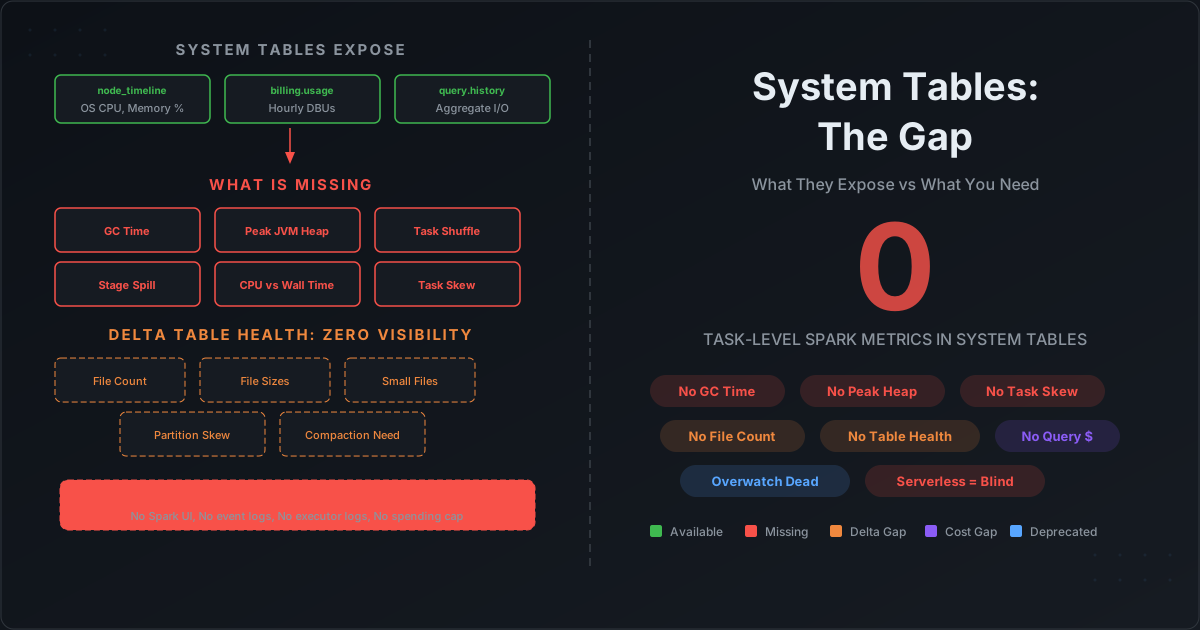
Databricks system tables look comprehensive on paper. Sixteen tables across ten schemas. Billing, compute, jobs, queries, lineage, audit. When Databricks deprecated Overwatch and pointed everyone to system tables, the message was clear: this is the future of observability.

But if you have ever tried to answer these questions using only system tables, you already know the gap:

  • Why is my job's GC time at 15%? (System tables do not track GC time.)
  • Which stage is spilling to disk? (System tables do not track per-stage spill.)
  • Which executor is the memory bottleneck? (System tables do not track executor-level JVM metrics.)
  • How many files does my Delta table have? Is it healthy? (System tables do not track Delta table physical metrics.)
  • What did my serverless job's infrastructure look like? (System tables do not populate node_timeline for serverless.)

This post documents exactly what Databricks system tables contain — column by column — and exactly what is missing. Every claim is verifiable against Databricks' own documentation.

How to Profile Spark Jobs After Completion: The Complete Guide to Collecting Metrics on Databricks, EMR, and Dataproc

· 22 min read
Cazpian Engineering
Platform Engineering Team

How to Profile Spark Jobs After Completion

Your Spark job finished. It ran for 2 hours. It used 50 executors. The bill arrived. Now what?

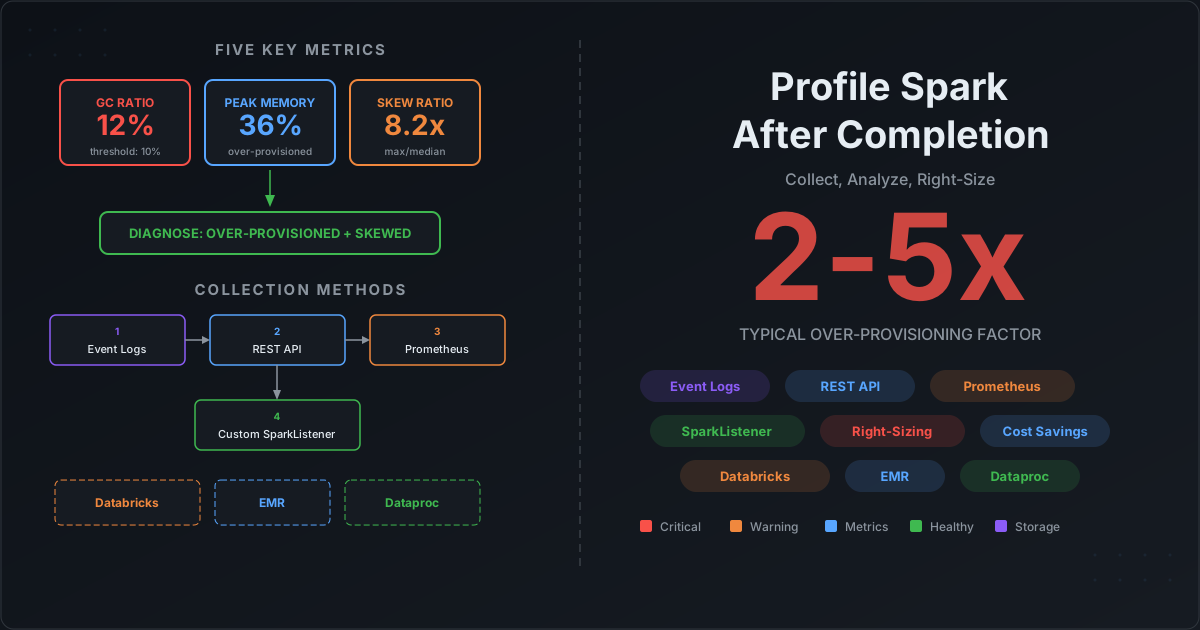
Most teams have no systematic way to answer the obvious follow-up questions: Was 50 executors the right number? Did we waste memory? Was there data skew? Should we use different instance types? They either overprovision "just in case" — burning 2-5x the needed budget — or reactively debug when jobs fail with OOM errors.

The root cause is not a lack of tooling. It is a data collection problem. Spark generates extraordinarily detailed metrics at every level — task, stage, executor, application — but those metrics vanish when the application terminates. If you did not capture them during or immediately after execution, they are gone.

This post solves that problem. We cover every method for collecting Spark profiling metrics, show exactly how to set them up on Databricks, EMR, and Dataproc, and then show you how to turn those metrics into right-sizing decisions with concrete formulas and thresholds.

Iceberg Scan and Commit Fine-Tuning: The Production Operations Guide for Spark

· 29 min read
Cazpian Engineering
Platform Engineering Team

Iceberg Scan and Commit Fine-Tuning: The Production Operations Guide for Spark

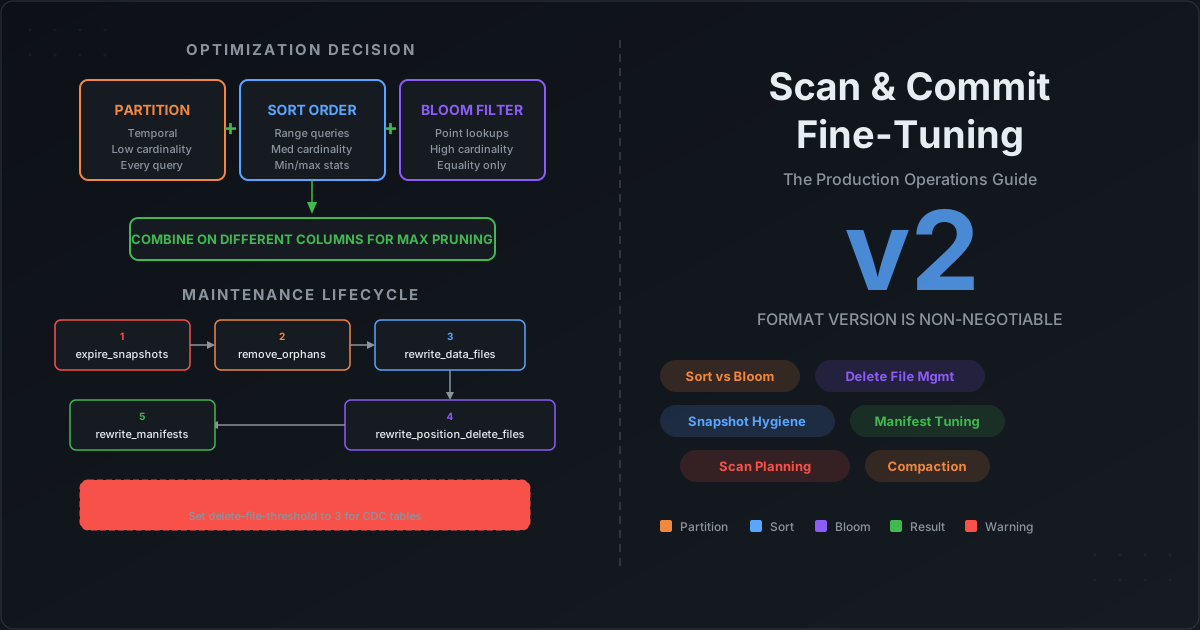
You have set up your Iceberg tables. You picked a partition spec. You enabled bloom filters. Maybe you even ran compaction once. But the questions keep coming: Should I sort the table AND add bloom filters, or is one enough? My queries are still opening thousands of files — what is Spark actually doing during scan planning? I have 50,000 snapshots — is that a problem? I switched to format version 2 but my reads got slower — why? What happens if I never compact my delete files?

These are the questions that every data engineering team hits after the first month in production. The individual features are documented, but the interactions between them — and the operational decisions that determine whether your tables stay fast or silently degrade — are not written down anywhere.

This post is the production operations guide. We cover the decision framework for partition vs sort vs bloom filter, explain exactly what happens during scan planning so you know where compute is wasted, walk through every maintenance procedure with recommended thresholds, explain why format version 2 is non-negotiable and what delete file neglect costs you, and give you the complete maintenance lifecycle in the right execution order.

Spark Runtime Metrics Collection with DriverPlugin, ExecutorPlugin, and SparkListener

· 23 min read
Cazpian Engineering
Platform Engineering Team

Spark Runtime Metrics Collection with DriverPlugin, ExecutorPlugin, and SparkListener

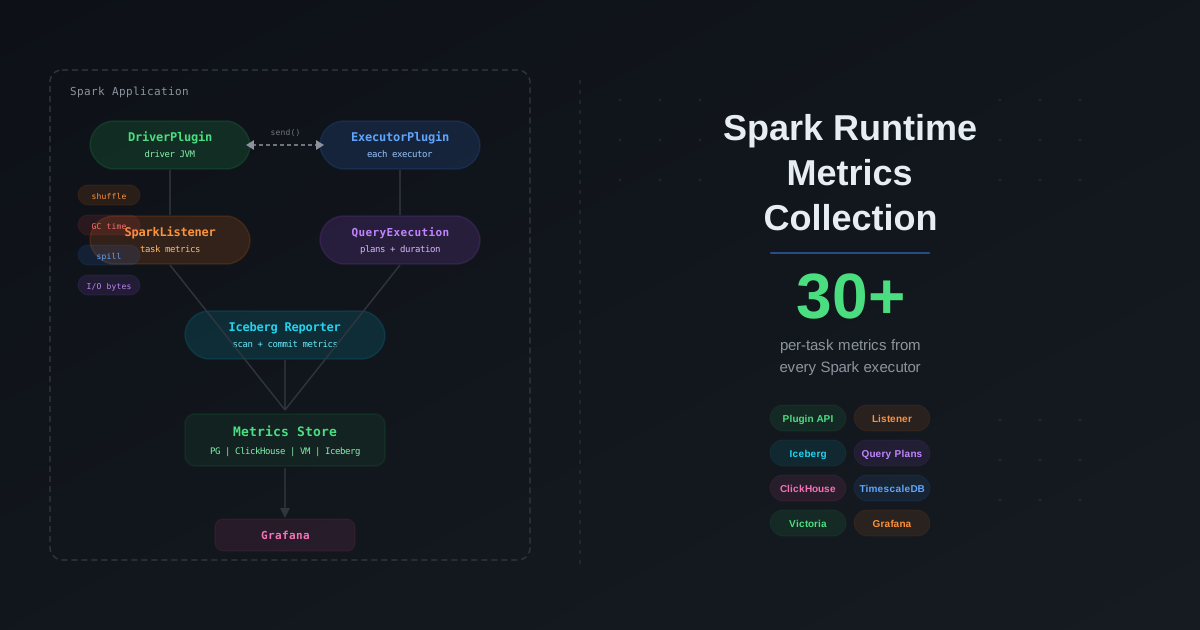
You tuned your Spark cluster. You picked the right join strategies. You enabled AQE. But you are still flying blind. When a job takes twice as long as yesterday, you open the Spark UI, scroll through 200 stages, and guess. When an Iceberg scan suddenly plans for 12 seconds instead of 2, you have no history to compare against. You cannot trend what you do not collect.

Apache Spark ships a powerful but underused plugin system — DriverPlugin, ExecutorPlugin, and SparkListener — that lets you tap into every metric the engine produces at runtime. Combined with Iceberg's MetricsReporter, you get a unified view of compute and storage performance for every query, every task, and every table scan. This post shows you how to build that pipeline from scratch, store the metrics at scale, and turn raw numbers into actionable performance insights.

The Complete Apache Spark and Iceberg Performance Tuning Checklist

· 35 min read
Cazpian Engineering
Platform Engineering Team

The Complete Apache Spark and Iceberg Performance Tuning Checklist

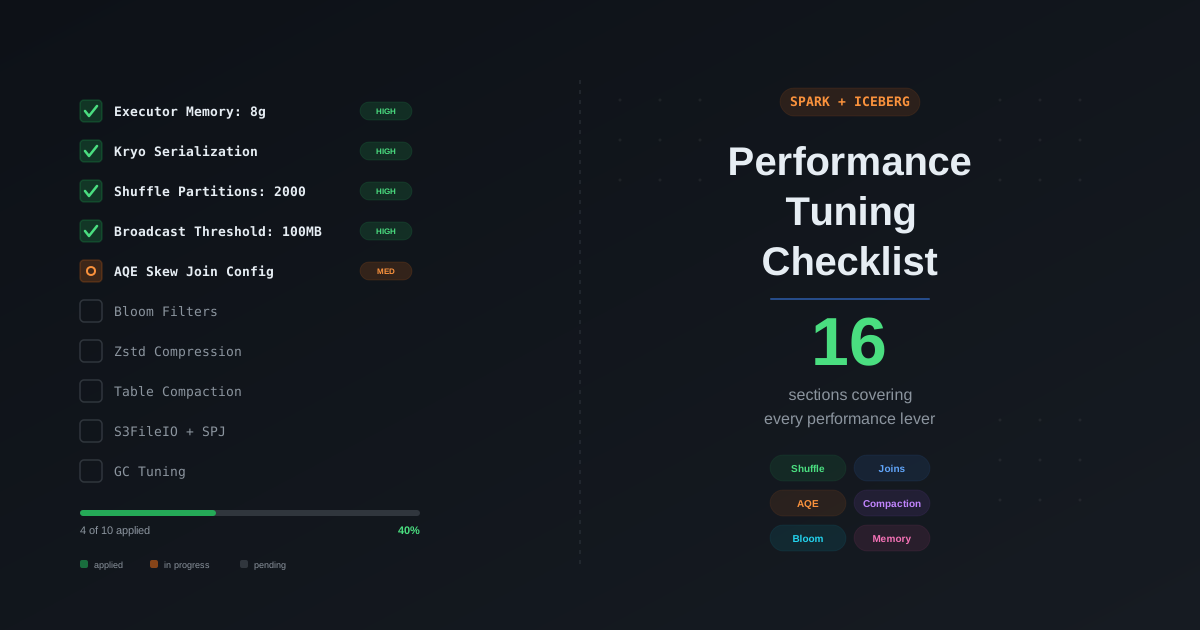
You have a Spark job running on Iceberg tables. It works, but it is slow, expensive, or both. You have read a dozen blog posts about individual optimizations — broadcast joins, AQE, partition pruning, compaction — but you do not have a single place that tells you what to check, in what order, and what the correct configuration values are. Every tuning session turns into a scavenger hunt across documentation, Stack Overflow, and tribal knowledge.

This post is the checklist you run through every time. We cover every performance lever in the Spark and Iceberg stack, organized from highest impact to lowest, with the exact configurations, recommended values, and links to our deep-dive posts for the full explanation. If you only have 30 minutes, work through the first five sections. If you have a day, work through all sixteen. Every item has been validated in production workloads on the Cazpian lakehouse platform.

Spark Execution Plan Deep Dive: Reading EXPLAIN Like a Pro

· 36 min read
Cazpian Engineering
Platform Engineering Team

Spark Execution Plan Deep Dive: Reading EXPLAIN Like a Pro

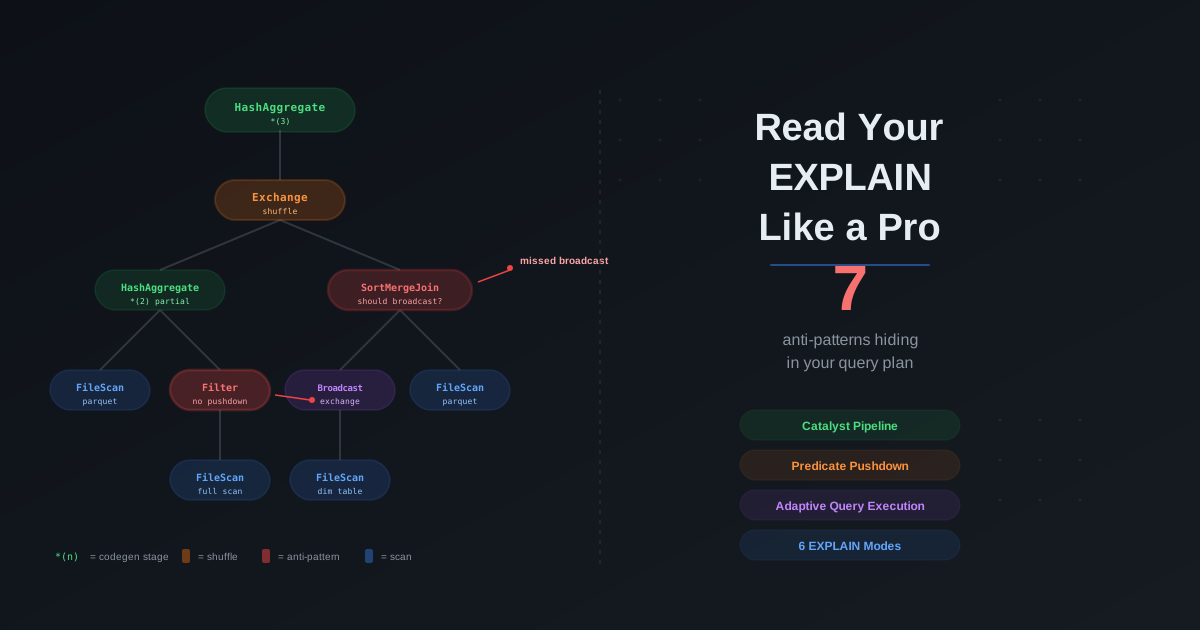
You open the Spark UI after a three-hour job finishes. The SQL tab shows a wall of operators — SortMergeJoin, Exchange hashpartitioning, *(3) HashAggregate, BroadcastExchange HashedRelationBroadcastMode. Your teammate asks why the optimizer did not broadcast the small dimension table. You stare at the plan. You recognize some words. You do not know how to read it.

Every Spark performance guide says "check the execution plan." Every tuning blog says "verify predicate pushdown in the EXPLAIN output." Every debugging guide says "look for unnecessary shuffles." None of them teach you how to actually read the plan from top to bottom — what every operator means, what the asterisk notation is, what the three different filter fields in a FileScan node represent, or how the plan you see before execution differs from the plan that actually runs.

This post is the missing manual. We start with how Spark transforms your code into an execution plan through the Catalyst optimizer pipeline, cover every EXPLAIN mode and when to use each one, walk through every physical plan operator you will encounter, explain whole-stage code generation and what the *(n) notation means, show how to verify predicate pushdown, cover how Adaptive Query Execution rewrites plans at runtime, map EXPLAIN output to the Spark UI, catalog the anti-patterns you can spot in any plan, and finish with a full annotated walkthrough of a real query.

Spark OOM Debugging: The Complete Guide to Fixing Out of Memory Errors

· 22 min read
Cazpian Engineering
Platform Engineering Team

Spark OOM Debugging: The Complete Guide to Fixing Out of Memory Errors

The job fails. The log says OutOfMemoryError. Someone doubles spark.executor.memory from 8 GB to 16 GB. The job passes. Nobody asks why. The team moves on, carrying twice the compute cost forever.

Three months later, data volume grows. The same job fails again. They double it to 32 GB. Then 64 GB. Then they hit the maximum instance type and cannot scale further. Only then does someone ask: "What is actually consuming all this memory?"

This is the most expensive pattern in data engineering. Teams treat Spark memory as a single dial and OOM errors as a signal to turn it up. They do not distinguish between driver OOM and executor OOM. They do not check whether the problem is a single skewed partition, an oversized broadcast, a missing unpersist(), or a collect() call buried in a utility function. They do not know how to read GC logs, check spill metrics, or use the Spark UI to pinpoint the memory bottleneck.

This post gives you the complete debugging toolkit. We cover every type of OOM error, how to tell driver from executor, a step-by-step debugging workflow, GC tuning for G1GC and ZGC, memory observability with Prometheus and Grafana, the most common anti-patterns, and how Cazpian eliminates the guesswork.

Spark Memory Architecture: The Complete Guide to the Unified Memory Model

· 17 min read
Cazpian Engineering
Platform Engineering Team

Spark Memory Architecture: The Complete Guide to the Unified Memory Model

A Spark job fails with OutOfMemoryError. The team doubles spark.executor.memory from 8 GB to 16 GB. The job passes. Nobody investigates why. Three months later, the same job fails again on a larger dataset. They double it again to 32 GB. The cluster bill doubles with it.

This is the most common pattern in Spark operations — and the most expensive. Teams treat memory as a single knob to turn up. They do not know that Spark splits memory into distinct regions with different purposes, different eviction rules, and different failure modes. They do not know that their 16 GB executor only gives Spark 9.42 GB of usable unified memory. They do not know that their driver OOM has nothing to do with executor memory. They do not know that half their container memory is overhead they never configured.

This post explains exactly how Spark manages memory. We cover the unified memory model with exact formulas, the difference between execution and storage memory, driver vs executor memory architecture, off-heap memory with Tungsten, container memory for YARN and Kubernetes, PySpark-specific memory, and how to calculate every region from your configuration. The companion post covers OOM debugging, GC tuning, and observability.

Spark SQL Join Strategy: The Complete Optimization Guide

· 36 min read
Cazpian Engineering
Platform Engineering Team

Spark SQL Join Strategy: The Complete Optimization Guide

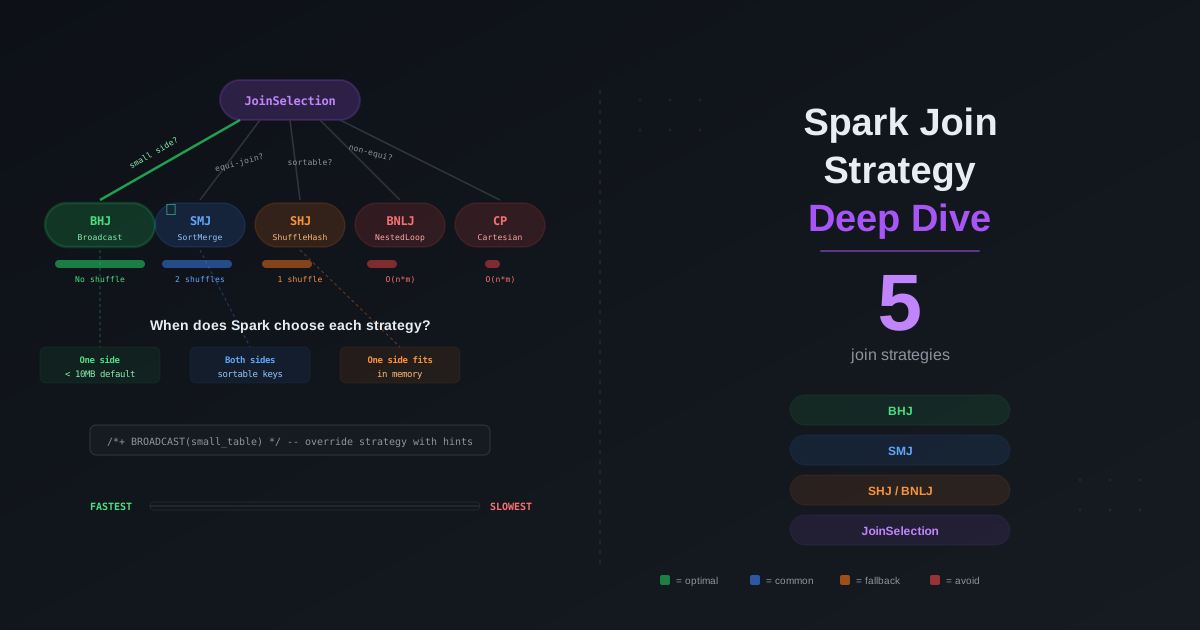
Your Spark job runs for 45 minutes. You check the Spark UI and find that a single join stage consumed 38 of those minutes — shuffling 800 GB across the network because the optimizer picked SortMergeJoin for a query where one side was 40 MB after filtering. Nobody ran ANALYZE TABLE. No statistics existed. The optimizer had no idea the table was small enough to broadcast.

The join strategy is the single most impactful decision in a Spark SQL query plan. It determines whether your data shuffles across the network, whether it spills to disk, whether your driver runs out of memory, and whether your query finishes in seconds or hours. Spark offers five distinct join strategies, each with different performance characteristics, memory requirements, and failure modes. The optimizer picks one based on statistics, hints, configuration, and join type — and it often picks wrong when it lacks information.

This post covers every join strategy in Spark, how the JoinSelection decision tree works internally, how the Catalyst optimizer estimates sizes, how CBO reorders multi-table joins, every join hint and when to use it, how AQE converts strategies at runtime, the equi vs non-equi join problem, how to read physical plans, the most common anti-patterns, and a real-world decision framework you can use in production.