5 posts tagged with "AWS"

View All Tags

Iceberg on AWS: S3FileIO, Glue Catalog, and Performance Optimization Guide

· 20 min read
Cazpian Engineering
Platform Engineering Team

Iceberg on AWS: S3FileIO, Glue Catalog, and Performance Optimization Guide

If you are running Apache Iceberg on AWS, the single most impactful configuration decision you will make is your choice of FileIO implementation. Most teams start with HadoopFileIO and s3a:// paths because that is what their existing Hadoop-based stack already uses. It works, but it leaves significant performance on the table.

Iceberg's native S3FileIO was built from the ground up for object storage. It uses the AWS SDK v2 directly, skips the Hadoop filesystem abstraction entirely, and implements optimizations that s3a cannot — progressive multipart uploads, native bulk deletes, and zero serialization overhead. Teams that switch typically see faster writes, faster commits, and lower memory usage across the board.

This post covers everything you need to run Iceberg on AWS efficiently: why S3FileIO outperforms s3a, how to configure every critical property, how to avoid S3 throttling, how to set up Glue catalog correctly, and how to secure your tables with encryption and credential vending.

Iceberg Backup, Recovery, and Disaster Recovery: A Complete Guide

· 15 min read
Cazpian Engineering
Platform Engineering Team

Iceberg Backup Recovery and Disaster Recovery

Someone dropped the table. Or worse — they dropped it and ran expire_snapshots and remove_orphan_files. The catalog entry is gone. The metadata cleanup already happened. Your Slack channel is on fire. Can you recover?

The answer depends entirely on what you set up before the disaster. Apache Iceberg does not have a built-in backup command. There is no UNDROP TABLE that magically restores everything. But Iceberg's architecture — with its layered metadata files, immutable snapshots, and absolute file paths — gives you powerful building blocks for backup and recovery if you understand how they work.

This guide covers three scenarios: recovering a dropped table when data files still exist on S3, building a proper backup strategy so you are always prepared, and setting up cross-region disaster recovery for production-critical tables.

Migrating From Hive Tables to Apache Iceberg: The Complete Guide — From On-Prem Hadoop to Cloud Lakehouse

· 24 min read
Cazpian Engineering
Platform Engineering Team

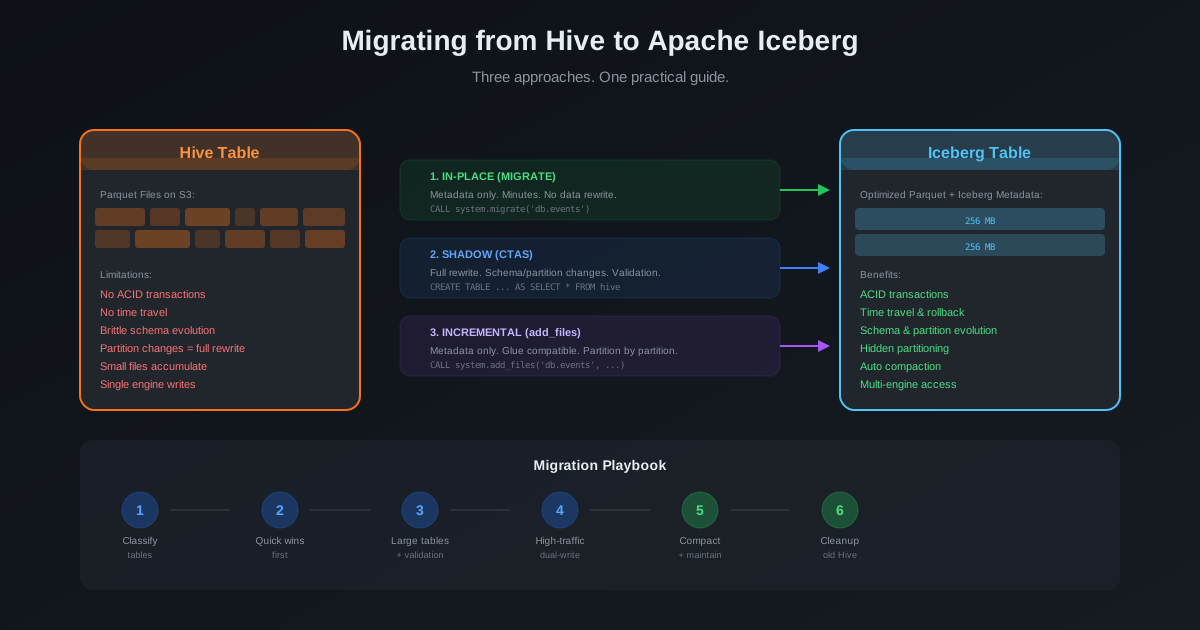
Migrating From Hive Tables to Apache Iceberg

If you are reading this, you probably fall into one of two camps. Either your Hive tables are already on cloud object storage (S3, GCS, ADLS) and you want to convert them to Iceberg format. Or — and this is the harder problem — your Hive tables are sitting on an on-premises Hadoop cluster with HDFS, and you need to move everything to a cloud-based lakehouse with Iceberg.

This guide covers both scenarios. We start with the harder one — migrating from on-prem Hadoop HDFS to a cloud data lake with Iceberg — because that is where most teams get stuck. Then we cover the table format conversion for data already on cloud storage. Both paths converge at the same destination: a modern, open lakehouse built on Apache Iceberg.

Introducing Cazpian: An AWS-first Lakehouse Platform

· One min read

Introducing Cazpian: An AWS-first Lakehouse Platform

We are excited to announce Cazpian, a new kind of data platform built from the ground up for AWS.

In today's world, data teams face a constant struggle: how to manage massive amounts of data without getting bogged down by infrastructure complexity. Cazpian solves this by combining the power of Apache Iceberg and Apache Spark into a seamless, managed experience.